Pages

Showing posts with label mac software. Show all posts

Thursday, February 2, 2012

Dashlane, A New Password Manager For Windows and Mac

Just yesterday we have reviewed the Norton Identity Safe password manager which had been released as a beta version earlier this month. Today, I’m going to look at another password manager that is currently making the rounds.

Dashlane is currently in private beta, which means that you need an invite to start using it (thanks to The Next Web). Once you have have entered your email address you are redirected to a page where you can download the Windows or Mac client to your local system.

Dashlane currently connects with the Chrome and Firefox web browser only, with an Internet Explorer version in the making. Installation gives users choice to connect to one, multiple or all of the supported browsers, which is better than Norton’s all or nothing approach. It felt kinda weird though that you had to close all browsers, even if you unselected the extension from being installed in them.

The program ships with a desktop program that you can use for all management purposes, and a browser extension that handles input and detection in the web browser.

The browser extension basically acts as a link between the desktop app and the web browser. It can fill out login information automatically for you if you have configured it that way, and will automatically ask you if you want to send new logins to the password manager for safe keeping. It is furthermore possible to click into a login form directly to select one of the available accounts for the site.

You can configure the program to generate strong passwords for you whenever you register new accounts. Just click in the password field of the registration form, and then on the generate strong password button that appears right beneath it to create a strong password.
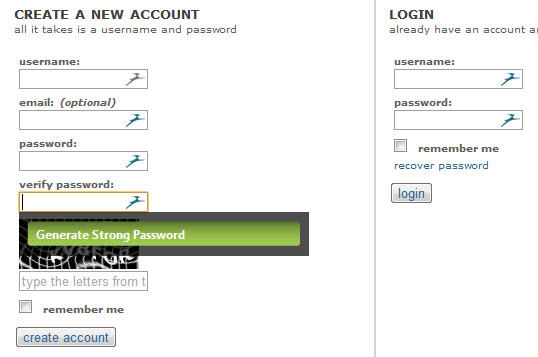
generate strong password

Dashlane furthermore can do all the form filling for you, if identity related information have been saved into the program’s database previously. The program takes care of multiple identities for you, and if you like also of ID related information and payments that you make on the Internet. These information can then be filled out automatically whenever you register a new account on a site.

One interesting feature of the desktop application is the security dashboard, which lists password strength ratings for all accounts.

password manager

Links point directly to low safety accounts giving users options to change their passwords on site directly to make them more secure.

The desktop app is protected by a master password which needs to be supplied on start before you are able to access the information. The developers have published a white paper that explains the security concept in detail.

You can synchronize password information easily, provided that your devices are running a support operating system and web browser. Data is encrpyted with an AES-256 key before it is written to the computer’s hard drive. Information may also be stored in the cloud, if users select to synchronize their information across devices for instance.

Users can access their data on the web as well, which is useful if you are on a public PC, mobile phone or computer that’s not compatible with the Dashlane desktop app. They should note though that the web app is read-only.

The program only asks you if you want to import your browser passwords into the password manager (and delete them afterwards). Users find desktop password manager import options under the File menu. Supported are popular password managers such as Last Pass, KeePass or 1Password.

Dashlane Presentation Video

Closing Words

Dashlane shows a lot of promise for a closed beta product. It is definitely superior to Norton’s password manager at this point in time. Not everything is golden though right now. The program lacks support for Internet Explorer, Opera and Safari currently, with only Internet Explorer listed as “soon” to be compatible.

An option to generate secure passwords, or to modify password creation rules, is not available currently.

It is also not clear if the developers plan to turn the service into a commercial password manager at a later point in time, or if they are going down the LastPass road which would keep the basic desktop version free.

If you are looking for a password manager for Windows or Mac, and are using Firefox or Chrome, I suggest you give it a try.


Friday, January 13, 2012

Create Local Websites With Ampps

The majority of web developers develop their websites and services locally before they publish them on the Internet. This makes sense in a variety of ways, from saving a lot of bandwidth to faster updating or improved security.

Even better, new technologies have made it a lot easier to setup a local web development system on any PC. Ampps, which stands for Apache MySQL PHP Python Softalicious, is a free web development environment for the Windows and Mac OS X operating systems that can be installed with just a few clicks. Once up and running, it is up to the user to install web applications from the local admin interface. The program can install 260 web applications that include highlights such as WordPress, Joomla or Drupal, and lesser known applications such as the course management system Moodle, several types of Wikipedia-like applications or feed aggregators such as Gregarius.

softaculous ampps

When you first start the program after installation you’ll get into the admin console where you can configure Apache, MySQL and PHP, and start, stop and restart the services.

Links in the form of icons open the local web administration interface or the apps that are currently up and running.

The web admin interface displays a list of application categories on the left, and links to core admin pages to the right. Here you can install and maintain databases, manage and add domains, edit general settings or access PHP and Perl information.

To install a web application, you click on the download button next to it to bring up a page with detailed information about it. You can install the script right away, or look at features and screenshots, open a demo page or access ratings and reviews.

web application

A click on install opens the software setup page with all information filled out automatically. While it is possible to run the setup with the selected values, it is suggested to change at least the admin username or password if required.

A click on Install on the page downloads and installs the latest package automatically on the local system. You can thereafter open the new application to work with it.

wordpress local installation

What sets Ampps apart from other solutions like WordPress Portable, XAMPP or Wampserver are the applications that the program ships with. The inclusion of phpMyAdmin and SQlite Manager is also a great help in importing existing data into the local development environment.

Web Developers and users who want to run web applications locally can make use of Ampps to do so. Ampps is available for Windows and Mac OS X. Downloads are offered at the developer website.


Sunday, January 8, 2012

Frostwire, Bittorrent Client With Built-In Search

One of the reasons for the success of the file sharing application Limewire was that it offered everything that one needed to get started. The program came with built-in options to search for and download files. All you had to do was to key in names that you were interested in, wait for the search results to populate, to start downloading any interesting sounding files with another click.

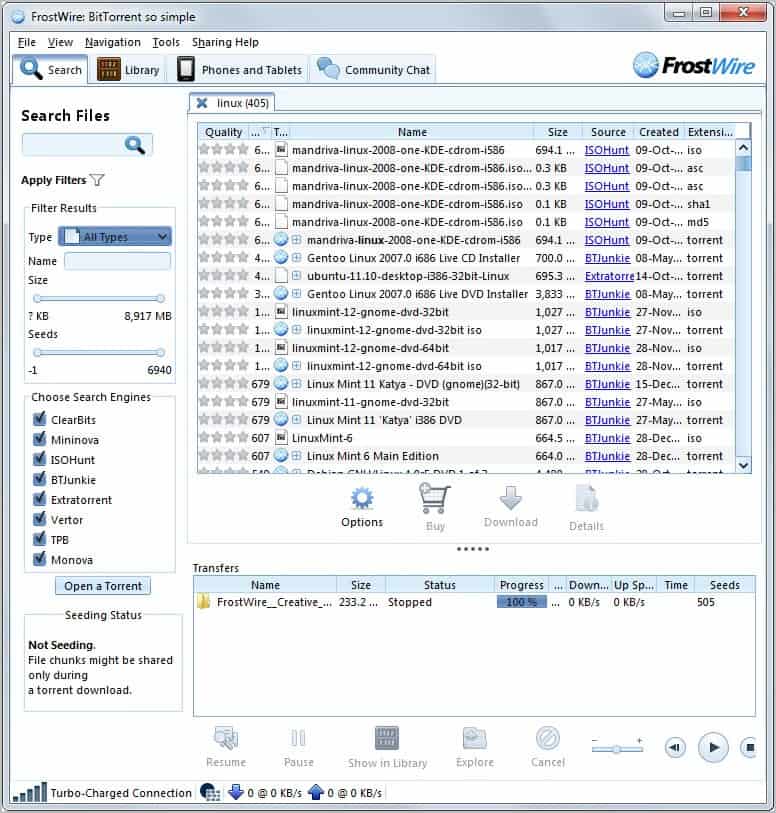
Frostwire takes that concept and makes it available as a Bittorrent client. While you can use the p2p software like any other Bittorrent client, it is the built-in search that many users will find most useful. The program supports eight different torrent indexers, including The Pirate Bay, Mininova, Isohunt or BTJunkie.

frostwire p2p client

All you need to do is to enter a search term and hit the enter key to search all or only selected torrent indexing sites. Filters allow you to limit the search results, for instance to only display audio or document results, or files with a specific minimum file size.

Results are displayed with their name, number of seeders, total file size, source, creation date and file extension with options to sort by all values. This can be helpful to sort from largest to lowest file size or seeder count for instance.

Once you have selected files you have options to download them all at once to your computer with a click on the download button or by double-clicking individual files. All downloads are added to the transfer display that is displayed beneath the search results. Controls at the bottom of the page are available to pause, resume or cancel file downloads, or to play media type directly in the interface.

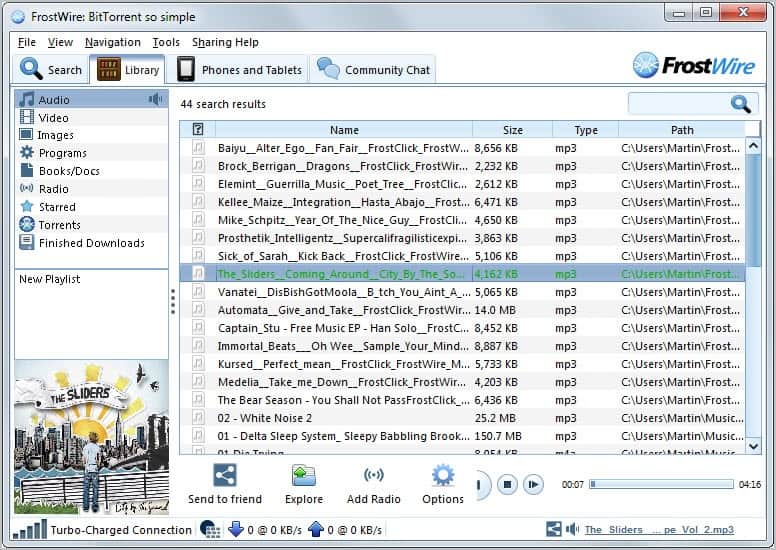
All downloads are automatically available in the Library tab. Files are sorted into categories such as programs, images or audio with options to create audio playlists right in the program. A search is also provided to find files faster, which appears to be necessary as it is not possible to display files by download. The explore option, available in the bottom bar and on right-click, lets you open the folder containing the selected file in Windows Explorer.

frostwire library

Frostwire can transfer files to connected phones or tablets, the interface does not seem overly intuitive though. There is also a chat available for users who’d like to chat with the FrostWire community.

The options hold several interesting preferences. Users of Apple’s iTunes software can configure Frostwire to automatically import downloaded songs into iTunes. It is furthermore possible to add or remove folders that are included in the library, to configure keywords that should not be displayed in the search results (with an extra option to ignore adult contents), and to change Bittorrent related preferences like the port that is used for all connections.

Users who would like an all-in-one program should take a closer look at Frostwire. Combination of search and downloading makes it much more usable than comparable clients. Features offered by other Bittorrent clients like uTorrent are on the other hand not available. This includes the ability to play media while it is still downloading or a web client to manage downloads remotely.

The program will install the Ask Toolbar and another program during installation if you do not pay attention to the process.

Frostwire is available for Windows, Macintosh, Linux and Android 2.1+ operating systems.


© Martin Brinkmann for gHacks Technology News | Latest Tech News, Software And Tutorials, 2012. | Permalink |
Add to del.icio.us, digg, facebook, reddit, twitter
Post tags: , , ,


Saturday, January 7, 2012

Test Your PC’s Stability

Testing a PCs stability makes sense in a number of situations. Maybe you have made the decision to overclock your PC and want to make sure that everything runs well and stable, or you are thinking of giving away your old PC to a friend or family member who is not the most knowledgeable person when it comes to computers. Making sure that the system runs fine can save you troubleshooting sessions later on.

System Stability Tester is a free open source software for Windows, Linux and Mac systems that can stress test and benchmark a computer system. It does so by calculating up to 128 million digits of Pi which is extremely taxing for the processor.

When you first start the program you have the choice to run a benchmark or system stress test. A benchmark can be used to compare the results of a system to another system, the stress test to verify that there are no calculation errors.

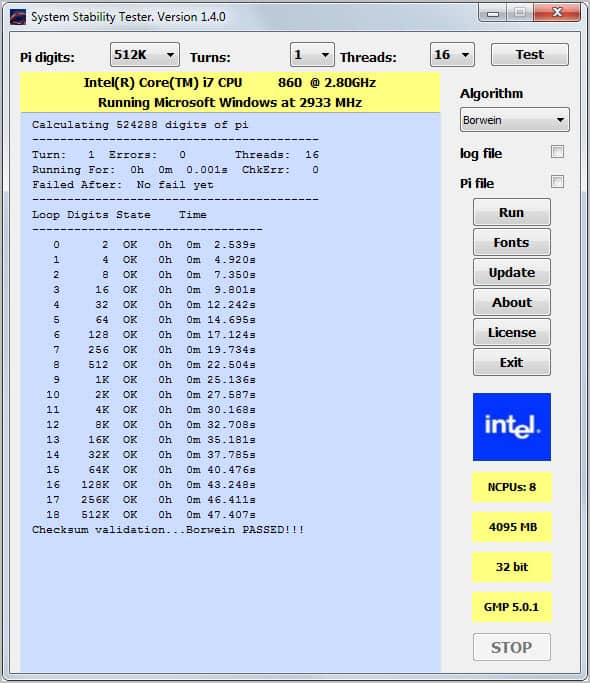
You can also select the amount of Pi digits you want to compute, the turns, and the number of threads the computer should use for that task.

system stability tester

The stress testing application supports two pi computation algorithms: The Quadratic Convergence of Borwein and Gauss-Legendre with Borwein being selected by default.

Please note that you can only run a stress test if at least two threads are selected. The program then starts the calculation which can slow down the PC considerable during operation. Statistics are updated regularly that display the amount of calculated Pi digits, the state, and time it took to calculate them.

An overview at the top highlights the total amount of errors of the calculation as well as the processing time until the first error was detected.

You can optionally save a log file or a Pi file. The first saves basic information about the run, the second all Pi digits.

One of the core advantages of System Stability Tester is that it is available for Mac, Linux and Windows systems, which means that it can be used to compare the performance of computers running different operating systems.

Interested users can download System Stability Tester from the developer website over at Sourcerforge.


© Martin Brinkmann for gHacks Technology News | Latest Tech News, Software And Tutorials, 2012. | Permalink |
Add to del.icio.us, digg, facebook, reddit, twitter
Post tags: , , , ,


Monday, January 2, 2012

Synchronize Google Docs documents With Local PCs

Google Docs users have quite a few options to synchronize their online documents with local computer systems. Among them Gladinet Cloud Desktop, the Microsoft Office add-in OffiSync or DocSyncer.

Insync is a new option for Mac and Windows users (and soon Linux as a Linux port is in the making) who want to synchronize their Google Docs documents with local PCs. The program uses Google’s own authentication system for authorization, which means that you do not have to supply your Google login information to use the program.

The first thing that you need to do after installation is to link machines to the service. Linked machines are the only systems that will synchronize documents with Google Docs. Linking did not work right away on a test system, a restart of the application did however resolve the issue.

A web page is opened if your run the program from a new system to link the new computer with the synchronization service. Once done, files will get synced automatically to the system whenever the app is running. Please note that you do not have options to sync selected files or folders with local machines. If you configure Insync to run on a system, everything will be synchronized.

insync

Documents are by default stored in the Insync\Google Docs Email\ folder in the My Documents folder. It is possible to change the root document folder but not the folder name.

Any changes that you make locally to your documents will be synced with Google Docs automatically and vice versa.

sync google docs

The developers have hinted at the possibility to use Google Docs and Insync as a Dropbox alternative. Since it is possible to upload non-document file types to Google Docs, it is possible to use the service to host files online. The biggest advantage over Dropbox is the price for additional storage that is up to eight times cheaper.

Users who do not want to buy additional storage on the other hand get only 1 Gigabyte of free storage space, which is half of what they get when they sign up for a Dropbox account.

insync

The Insync guide lists features that the program offers that Dropbox does not offer:

  • Read/write + read only sharing permissions (on folder + file)
  • File sharing (you have to share folders in Dropbox)
  • Share recipients aren’t charged against their Google Docs storage quota
  • Nested sharing (you know who you are!)
  • Google Docs collaboration
  • Leave Insync anytime and all your stuff are in your Google Docs account
  • No direct access to your files (a rogue employee will have to create a program that uses the Google Docs API and steal your access credentials to get at your files)
  • Insync only stores your file metadata

Some of the functionality is provided only on the Insync website and not in the client. This includes the ability to share documents among other features.

Google Docs users who want to synchronize their documents with multiple machines may find Insync quite useful for that purpose. The developers do have plans to integrate premium features at a later point in time. (via Caschy)


© Martin Brinkmann for gHacks Technology News | Latest Tech News, Software And Tutorials, 2012. | Permalink |
Add to del.icio.us, digg, facebook, reddit, twitter
Post tags: , , ,


Wednesday, December 28, 2011

Tunnelbear, Free, Easy to Install Virtual Private Network

Virtual private networks (vpns) allow users to securely connect to another computer, server or home PC, that acts as a proxy for all of their communications. The websites and services that you connect to communicate only with the vpn server and not with your computer. They in fact do not even know that your computer is involved.

Businesses and organizations use vpn servers to secure data transfer. This can be useful in countries where services or websites are blocked, or data transfers are likely monitored.

Home users can benefit from vpn connections as well. They can use it to protect their connection on a public network or to access services that they would not otherwise be able to access.

Users from outside the United States, or US citizens abroad, can use vpn servers to connect to sites such as Pandora, Hulu and many other services that are limited to users from the United States.

All they need for that is a VPN that is located in the United States. We have covered several vpn services that offer free limited accounts for users from all over the world. This includes the popular Hotspot Shield, Ultra VPN or Vypr VNP which is free for Giganews Diamond account owners.

TunnelBear is a vpn service that is offering easy to install and use clients for Windows and Macintosh PCs. Users need to register an account before they can make use of the vpn. A free account limits the monthly data transfer to 500 Megabytes, a commercial account allows unlimited transfers. Free accounts are protected with a 128-bit algorithm, while paid accounts make use of 256-bit data encryption.

tunnelbear

New users can setup an account right in the software during installation (please note that you need to confirm the email to log in). The program will handle all the heave lifting on its own, including the installation of a new network connection that is used to connect to the VPN.

The core application interface has only two switches. One to connect to the virtual private network, and the other to select a US or UK server to connect to.

tunnelbear

The interface displays the current connection status and the remaining bandwidth for the month.

TunnelBear offers one of the most comfortable experiences when it comes to setting up and using vpn servers. The 500 Megabyte limit should be enough for users who do not access a lot of media in a month. Those users may consider paying the reasonable price of $40 per year for unlimited data transfers. The company is currently running a Twitter promo that offers 1 Gigabyte of additional data transfer when completed.

TunnelBear can be downloaded from the developer website. The software is compatible with 32-bit and 64-bit editions of the Windows operating system, and for systems running Apple Mac OSX 10.6 or greater.


© Martin Brinkmann for gHacks Technology News | Latest Tech News, Software And Tutorials, 2011. | Permalink |
Add to del.icio.us, digg, facebook, reddit, twitter
Post tags: , , ,


Friday, December 9, 2011

TweetDeck Update Brings Native PC and Mac Clients

Remember TweetDeck, the Adobe Air Twitter client that offered better faster access to all things Twitter? Adobe Air was not the only platform TweetDeck was offered on. A web based version and Google Chrome application were offered as well by the developers.

TweetDeck made the list of Melanie’s Top 5 Twitter Add-ons and has been recently acquired by Twitter. Rumors surrounding the acquisition suggested that Twitter might have the intention to drop all versions of the application and integrate the development team into the in-house Twitter team.

Those rumors have now been refuted with the release of native TweetDeck clients for Windows and Mac operating systems. The Adobe Air client is no longer available on the official site, and it seems as if the developers have moved away from it completely.

The move has not been officially announced yet, while desktop clients are already offered on the official TweetDeck website.

tweetdeck

Users can start connecting their Twitter and Facebook accounts once the software has been installed on their system. The three columns Home, Me and Inbox are displayed by default. If you have followed yesterday’s news about the upcoming Twitter relaunch you know that this is the new Twitter terminology and layout (only discover is missing).

A click on Add Column displays additional data streams that can be added to the TweetDeck interface. This includes lists, trends, tweets, favorites and search results. The program displays configuration options. If you want to add a search column, you are asked to enter either a hashtag or keyword.

A new option is the notification option. A click on a column’s settings button opens a menu with options to enable notification sounds or popups.

twitter notifications

Not everything is golden though. Several features of the Adobe Air client went awol in the first desktop version. Different column sizes, color schemes or keyboard shortcuts are nowhere to be found in the native client versions of TweetDeck.

It is not clear if the features have been removed intentionally from the client, or removed because of time limitations to meet yesterday’s redesign deadline. (via Caschy)


© Martin Brinkmann for gHacks Technology News | Latest Tech News, Software And Tutorials, 2011. | Permalink |
Add to del.icio.us, digg, facebook, reddit, twitter
Post tags: , ,