Pages

Showing posts with label google https. Show all posts

Wednesday, November 23, 2011

Google Enables Forward Secrecy For HTTPS Services

Last year Google started to push the HTTPS protocol on many of their services which basically meant that users always connected to the https version of the site regardless of their own preference. Before that, https was only an option in a service’s settings. Gmail users for instance were able to enable https for their account since 2008 which basically forced the use of https for that connection.

Https encrypts the traffic between the user’s computer and the server. The core benefit here is that it protects the data from network snooping. That’s handy if you are using a public computer, are in a computer network or do not want your ISP or your boss to find out what you are doing on a particular site that has https enabled.

Yesterday Google announced that they have enabled forward secrecy by default.

Most major sites supporting HTTPS operate in a non-forward secret fashion, which runs the risk of retrospective decryption. In other words, an encrypted, unreadable email could be recorded while being delivered to your computer today. In ten years time, when computers are much faster, an adversary could break the server private key and retrospectively decrypt today’s email traffic.

Forward secrecy requires that the private keys for a connection are not kept in persistent storage. An adversary that breaks a single key will no longer be able to decrypt months’ worth of connections; in fact, not even the server operator will be able to retroactively decrypt HTTPS sessions.
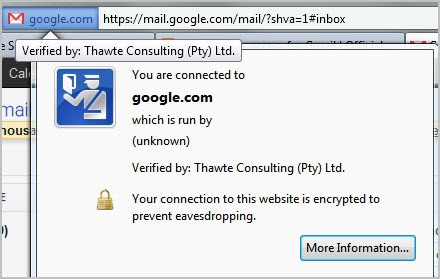
https perfect forward secrecy

Perfect forward secrecy basically makes sure that attackers cannot use private keys that they have obtained in the future can not be used to compromise data that has been recorded in the past.

Forward secrecy has been enabled for Google Mail (Gmail) and other Google services that use the https including SSL search, Google Docs and Google+.

The only browsers currently supported are Google Chrome and Firefox on all platforms and Microsoft’s Internet Explorer on Vista or later.

Google has also made available the work that they did on the open source OpenSSL library that made the implementation of forward secrecy possible. You can read the original announcement over at the Google Online Security blog.


© Martin Brinkmann for gHacks Technology News | Latest Tech News, Software And Tutorials, 2011. | Permalink |
Add to del.icio.us, digg, facebook, reddit, twitter
Post tags: , , , ,


Sunday, October 23, 2011

Google Redirects Your Search To Https? Change It!

Logged in Google users who do not follow the news as closely as the majority of Ghacks visitors may have noticed that Google started to redirect their searches on google.com from http to https automatically.

While that is certainly not a issue on most systems, it could lead to issues on some. If you are experiencing pages that do not load, broken applications or other issues you may want to fix or reverse the change.

Before I’m showing you how this is done I’d like to explain what’s happening.

Google recently announced that they would enable https, also known as encrypted, search for all logged in users that visit the main search engine google.com.

Logged in users who load http://www.google.com/ are automatically redirected to https://www.google.com/. Encrypted search can be beneficial as it encrypts the traffic that is send to and received from Google. This means that no one in your computer network (e.g. admins, your boss, your ISP) can see what you are doing on the Google website. They still see that you are on Google, and will see the sites that you click on though.

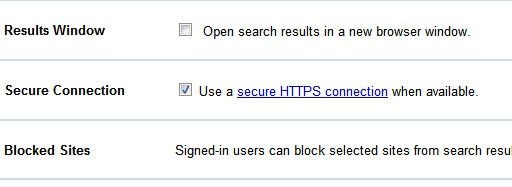
Using secure connections is an optional feature. On my PC, it is already enabled in the Chrome web browser but not in Firefox. Google has added a preference in the Global Search preferences to enable or disable the secure connection feature.

Google users who notice automatic redirects can prevent this from happening in the search settings. To do that they need to click on the options icon in the upper right corner of the screen (next to the profile name) and select Search Settings from the context menu that opens up.

They then need to scroll down until they find the Secure Connection setting.

secure connection

Secure connections are enabled if the box is checked. To disable simply remove the check mark and click Save Preferences. This puts an end to redirects to the https version of search.


© Martin Brinkmann for gHacks Technology News | Latest Tech News, Software And Tutorials, 2011. | Permalink |
Add to del.icio.us, digg, facebook, reddit, twitter
Post tags: , , , ,


Wednesday, October 19, 2011

Google Rolls Out Https Search For Logged In Users

Google back in May 2010 enabled https on their core search domain. Users back then were able to access https://www.google.com/ manually for improved security and privacy on the Google Search engine. Google quickly ran into a problem that the company did not anticipate at the time. Companies, organizations and schools began to block the search giant’s homepage as employees and students were able to use the encrypted search version to bypass web filters.

Google as a reaction moved encrypted search to its own subdomain under https://encrypted.google.com/ which seemed to have resolved the issue at that time.

Yesterday Google made the announcement that they will roll out encrypted search for logged in users automatically on google.com. What this means is that logged in Google users will be automatically redirected to https://www.google.com/ from http://www.google.com/. Users who are not logged in can access the encrypted page directly or use the standard unencrypted search page instead.

The core benefit of https over http is that the traffic is encrypted. Encryption means that attackers, employees or the user’s Internet Service Provider (ISP) cannot spy on the traffic that is exchanged between the user’s PC and the Google server. They do not see what a user does on Google.

The very same people do see the properties that users access after leaving the encrypted Google domain, for instance by clicking on a search result. And Google, obviously, sees it all just like before.

https www google com

Google will roll out the feature for all of the company’s users in the coming weeks. The move to https could become a serious issue for web statistics applications as webmasters will no longer see the search query that their users came from in web statistic apps.

These information are often used to optimize the site for a particular keyword or group of users.

Google notes that webmasters will still be able to see the top 1000 search queries in Google Webmaster Tools. And with the integration of some Webmaster Tools data in Google Analytics, one could wonder if Google is intentionally favoring their own web traffic analysis solution with the move.

Other search engines, Ixquick comes to mind, have been offering encrypted search for some time as well.

What’s your take on encrypted search? (Google Blog, via)


© Martin Brinkmann for gHacks Technology News | Latest Tech News, Software And Tutorials, 2011. | Permalink |
Add to del.icio.us, digg, facebook, reddit, twitter
Post tags: , , , ,