Pages

Showing posts with label rss feed. Show all posts

Sunday, February 12, 2012

Get News Notifications On Your Desktop With Feed Notifier

RSS feeds are dying. That’s what I’m hearing left and right. Many say that social networking sites have replaced them. And while social networking sites like Twitter or Facebook may be useful to stay up to date, they are nowhere near as accessible as a feed reader. You first need to follow users who post the news that you are interested in, then need to wade through everything they post to find the news, and lastly stay on the social networking site or use a desktop app to avoid missing news.

Feed Notifier is a news notification app for the Windows operating system. When you first start it up you are asked to add feeds to the program that you want to monitor. This is done with a right-click on the program’s system tray icon and the selection of Add Feed. You can also open the options to add feeds there.

Feeds can only be entered one at a time which is a severe limitation, especially if you want to monitor hundreds of feeds. You could combine multiple feeds with Yahoo Pipes to reduce the setup time.
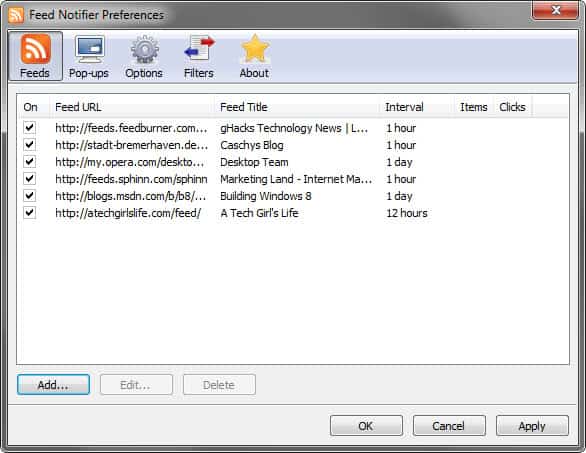
feed notifier

You can configure the polling interval and notification border color for each feed individually. A popup is then displayed in the lower right corner of the screen whenever new content has been added to one of the added websites and services.
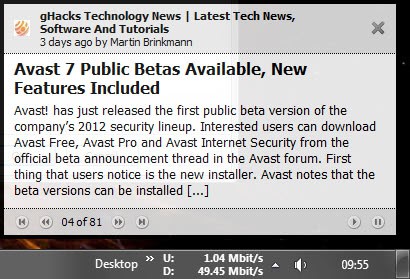
news popup

Controls are displayed at the bottom of the popup that allow you to go back and forward, and to pause the automatic updating. A click on the news title or blog name takes you to the site in the default system browser.

The popup appearance and behavior are configured in the preferences as well. Here it is possible to change the maximum title and body length, change the duration the popup is displayed or display it in another position or on another monitor.

Feed Notifier won’t check feeds if the computer has been idle for at least 60 seconds. It would not make sense to display news on an idle computer, as it is likely that the user working on it is currently not present. The option can be disabled if that’s preferred.

Filters can be configured for all feeds or individual feeds. These exclude news matching select keywords. This can be useful if you want to reduce the number of news popups throughout the day.

Feed Notifier is different in this regard from other feed readers such as RSS Owl or Google Reader. It is not a program that you open to read up on all the news item that have been posted since the last time you have taken a look. Its realtime approach works best if only a handful of news feeds are monitored. If you monitor hundreds, you probably end up spending more time looking at new news popups than working on the computer.

Interested users can download the open source software Feed Notifier from the developer website.


Friday, November 25, 2011

Use RSSOwl To Discover New RSS Feeds

RSSOwl, my feed reader of choice, offers several interesting features that are not apparent on first glance. You may now that I ended up with this Java based feed reader after using online tools such as Google Reader and offline apps like Feed Demon before.

The feature that I want to talk about today is the reader’s feed discovery service. This works pretty much the same way that Google Reader provides users with recommendations.

For that you need to click on Tools > Find more feeds in the program interface to launch the Import option. The Import Feeds matching the following topics option is already preselected in the Import dialog. All you need to do know is to enter a topic to find feeds related to that.

You may also want to check the Only Feeds that match my Language option to find only English feeds and non foreign language ones.

rss feed discovery

Click Next and wait until the results have been populated by the application. This takes a few seconds. Feeds that you have already subscribed to are hidden by default. Each feed is only listed with its name which makes the selection process less straightforward than that of Google Reader (the Google product displays title, description, url, weekly post averages and subscribers on the results page).

rss-feeds

You can select one of the suggested elements and click on the Preview button to get a feed preview. This is an important step to avoid adding feeds that are not providing useful information.

The search for Firefox revealed some great sites, like mine for instance, Mozilla Blog or Tweaking with Vishal, but also a lot of sites that most users interested in the topic won’t find useful, like the Yahoo Toolbar for Firefox RSS feed or the Toolbar Cleaner feed. I’m not entirely sure why my site and Vishal’s appeared in the search results as I’m subscribed to both in RSS Owl.

Dupes may appear if a site uses multiple RSS feed links, for instance a direct feed link and one hosted by a feed provider such as Feedburner.

I tested the feed discovery service with other keywords, Google Chrome, Internet Explorer, Windows 8 and always came up with a few gems that I did not know about or did not subscribe to. Especially the multi-word discovery works excellent and provides excellent results.

You can download RSS Owl from the developer website.


© Martin Brinkmann for gHacks Technology News | Latest Tech News, Software And Tutorials, 2011. | Permalink |
Add to del.icio.us, digg, facebook, reddit, twitter
Post tags: , , ,


Friday, October 21, 2011

FeedBeater, Create RSS Feeds, Email Alerts For Any Webpage

Many websites nowadays offer to send updates to the visitor either with the help of RSS feeds or email. Some websites on the other hand that you may find useful come without those options. If you want to stay up to date, you need to find a way to create custom email alerts or feeds to do so.

FeedBeater is an online service that can create RSS feeds or email alerts for any webpage on the Internet (that does not require login or is otherwise protected).

In the best case, all you need to do is to visit the FeedBeater website, enter the domain name or page url that you want to receive updates for, and select if you want RSS feed updates or email alerts.

feedbeater

email alert rss feed

Sometimes though this may not work sufficiently well, for instance if changes are detected that are not of interest or if changes are not detected by the site’s script. You can make use of the advanced options in this case.

Advanced options load a view of the website in the browser. You have two options to configure custom notifications. The first allows you to add keywords that the page should have or not have. The second to specify an area on the web page that is of importance to you. Changes in that area will then be reported while changes to other areas of the site won’t.

Both options can be used to fine tune the notification settings of the RSS feed creation and email alert option.

diffbot

The advanced option needs to be selected in most cases to make sure that updates are reported correctly. The default parser for instance displayed old posts as RSS feed updates on Ghacks.net. The advanced options allowed me to customize the selection and correct that issue. Users need to be aware that they need to supply an email address to the service if they use the advanced configuration options.

Interested users can check out FeedBeater here. Alternatives are Dapper, Feed43 or Feedity to create RSS feeds.

Are you using another service to create RSS feeds for pages that do not offer one by default?


© Martin Brinkmann for gHacks Technology News | Latest Tech News, Software And Tutorials, 2011. | Permalink |
Add to del.icio.us, digg, facebook, reddit, twitter
Post tags: , , , , ,