The Security Intelligence Report is a biannual report by Microsoft that analyzes past and present security trends. It focuses on “software vulnerabilities, software vulnerability exploits, malicious and potentially unwanted software, and security breaches”. The latest report published yesterday focuses on the first and second quarter of 2011 and compares the findings with data from previous years.
How does malware propagate? According to Microsoft’s report (gathered from Microsoft’s Security Removal Tool) almost 45% requires user interaction, e.g. executing a file. Another 43% uses AutoRun capabilities via USB or a network to infect a system. The remaining 12% list file infections, exploits where updates are available and password brute force attacks.
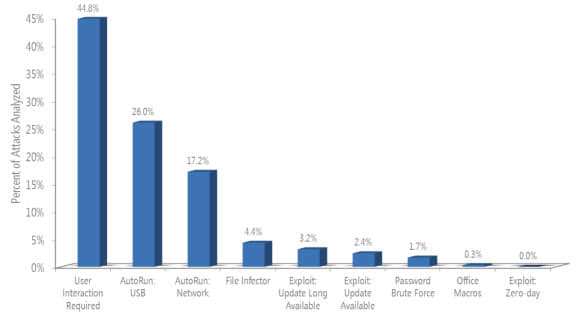
It is interesting to note that disabling autorun would eliminate nearly 50% of all malware threats. Exploits, which get lots of coverage on the Internet attribute to only 6% of detections.
A look at the different types of exploits reveal that exploits targeting Java were responsible for up to one-half of all exploits in a given quarter. Operating system exploits have passed HTML and Script exploits in the second quarter which can be solely attributed to a vulnerability i Windows Shell which was for instance exploited by the Stuxnet family.
When it comes to document exploits it is Adobe Reader and Acrobat who have accounted for most of the exploits in the first half of 2011.
Operating system infection rates paint an interesting picture. Nearly ten times as many Windows XP SP3 systems get infected as Windows 7 SP1 64-bit systems. Windows 7 Service Pack 1 32-bit systems have a ratio of 1:6 compared to Windows XP’s infection rate.
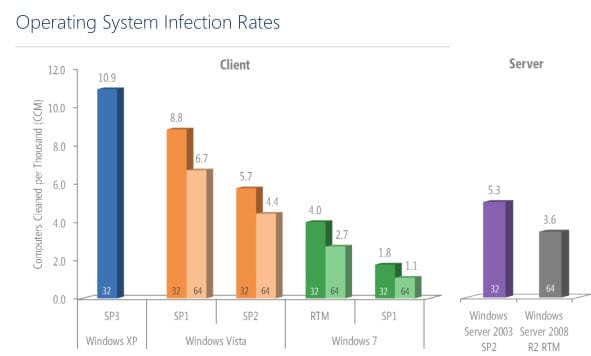
Even Windows Vista with its latest service pack installed reports only half of the infection rate that Windows XP reports.
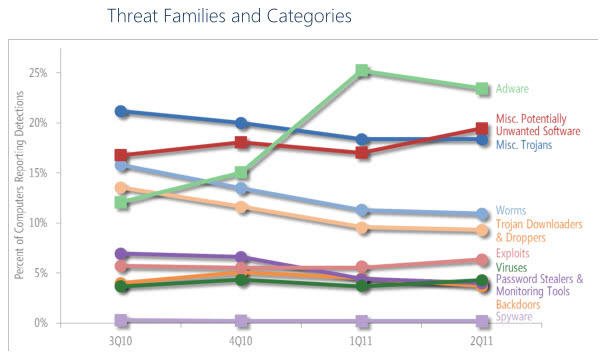
A look at the different threat families and categories sees Adware at the top followed by misc potentially unwated software, misc trojans and a second smaller group lead by Worms, Trojan downloaders, virus, password stealers and backdoors.
Email spam decreased dramatically in the past twelve months according to the Microsoft report. From 89 billion messages in July 2010 to 25 billion in June 2010. Microsoft attributes this to the takedown of two major botnets in August 2010 and March 2011.
Global Infection Rates by country
- United States:
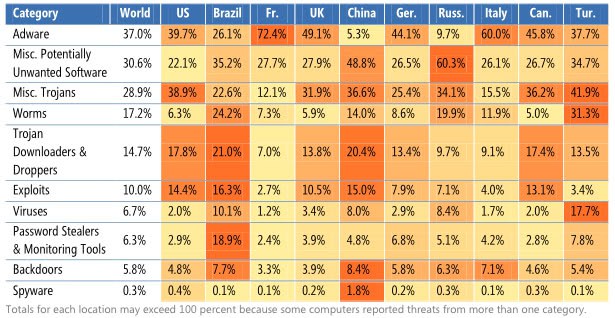
- Brazil: Most trojan downloaders and droppers, most exploits, most password stealers and monitoring tools.
- France: Most Adware
- United Kingdom
- China: Most backdoors and spyware
- Germany
- Russia: Most misc potentially unwanted software
- Italy
- Canada
- Turkey: Most misc trojans, Worms and Viruses
Interested users can download the latest report and previous reports from Microsoft’s Security Intelligence Report website.
© Martin Brinkmann for gHacks Technology News | Latest Tech News, Software And Tutorials, 2011. | Permalink |
Add to del.icio.us, digg, facebook, reddit, twitter
Post tags: malware infection, microsoft, Security Intelligence Report, trojan, virus


