Pages

Showing posts with label windows live. Show all posts

Monday, November 14, 2011

Hotmail Single Use Code To Sign In With

Whenever possible I prefer not to enter login information on third party computer systems and networks. Why? Because I do not have full control over the software running in the background. Other means of logging in are preferred, especially passwords that are only valid once and expire afterwards.

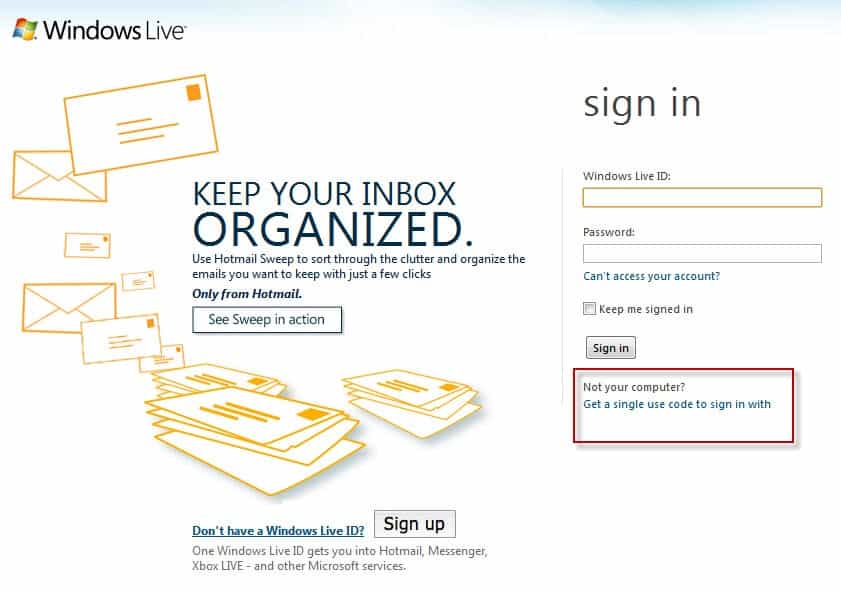
That’s what Hotmail has added to their website recently. When you open the Windows Live Hotmail website you see the standard Hotmail sign in screen for the most part. If you look below the Sign In button you see this:

Not your computer? Get a single use code to sign in with
hotmail sign in single use code

The sign in form changes when you click on the link. You are now asked to enter your Windows Live ID and the single use code instead of your regular password to log in to the service.

This is also indicated at the top where it states:

sign in with single use code. If you’re signing in from a public computer, you can use a single use code instead of your password for added security.

sign in single use code

If you do not have a code yet you can request one with a click on Get one here on the same page. You are then asked to enter your Windows Live ID and a mobile phone number that is linked to the account. Microsoft will send a text message to the phone number containing the single use code that you can use to sign in to Hotmail.

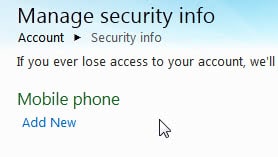
If you have not linked a mobile phone number to your Windows Live account yet you can do so in the account settings. Open the link and enter your standard login information. Click on the Manage link next to Security Info on the page and then on Add New below Mobile Phone on the next page.
hotmail mobile phone

The mobile phone number needs to be confirmed before it can be used for single use codes. Hotmail sends an email to the linked account email address. This email contains a confirmation link that you need to load to confirm the addition of the mobile phone number to the account. This obviously only adds to security if you do not use Hotmail as your email provider for that account email address.

Once the number has been verified you can start requesting single use codes for your Hotmail sign ins.

Single use codes are actually available on all Windows Live sign in forms.

The addition of single use codes adds to Hotmail’s and Windows Live’s security big time. What’s your take on this? (via)


© Martin Brinkmann for gHacks Technology News | Latest Tech News, Software And Tutorials, 2011. | Permalink |
Add to del.icio.us, digg, facebook, reddit, twitter
Post tags: , , , ,


Thursday, September 29, 2011

Windows 8 Sign-In With A Windows Live ID

One of the new features that Microsoft has added to Windows 8 is the ability to sign-in with a Windows Live ID instead of a local user account. One first start of the operating system you are asked to create an account. You can select to create a local account or use an existing or new Windows Live ID to do so. Some users may wonder what the benefits are of signing in with a Live ID instead of a local account. (To be precise, you associate a Windows Live ID with a local account)

The core benefit is that some data gets synchronized with the cloud. This includes common Windows settings, Metro style app settings and sessions, saved sign-in credentials for apps and websites, and automatic sign in to all apps and services that are powered by Windows Live. Settings include the lock screen picture, desktop wallpaper, user tiles, favorites and the history, Windows Explorer settings, mouse settings and many other settings that are stored in the cloud.

When you buy a Windows 8 PC and set up your user account for the first time, you can optionally choose to create an account that is associated to a Windows Live ID. You can either use an existing ID or create a new one. If you choose to create a new one, you can use any email address you want as your new ID, and then create your unique password. For example, you can use example@live.com or you can use someone@example.com. You just need to identify an email address that you want to have associated with the Windows Live ID service, and provide a unique password. Of course, you can also continue to use local Windows accounts as you always have and obviously, domain-administered accounts work as they always have as well.

You can configure the types of data that you want synchronized when using a Windows Live ID to sign in.

sync pc settings

Groups include:

  • Personalize – colors, backgrounds and lock screen
  • Themes – background image, sounds, and more on the desktop
  • Ease of access – speech recognition, magnifier, on-screen keyboard and narrator
  • Language preferences – keyboards, other input methods, display language, and more.
  • Apps – certain settings in your apps
  • Web browser – Internet settings like history, bookmarks and favorites
  • Other stuff – taskbar, Windows Explorer and search, HomeGroup, mouse and your account picture
  • Some passwords – for apps, websites and networks

You find the options in the Control Panel. Click on Sync PC Settings to enable or disable specific features.

There is one restriction in place that can be of importance if your computer system has a monitor that runs a resolution larger than 1920×1200. Windows will automatically compress and resize background images that are larger than 2 Megabytes to 1920×1200.

With cloud syncing, privacy and security becomes even more important. Microsoft has implemented safeguards to protect the Windows Live account from unauthorized access. This includes having to select a strong password and a secondary proof of identity which can be a secondary email address or phone number among other options. The proof of identity is used to establish trust and enable all synchronizing options (like passwords).

We’ve taken measures to safeguard the ID and password you use to sign in to Windows. We do this in a couple ways. First, we will require a strong password (and you can’t leave password blank). Next, we’ll collect a secondary proof of your identity. This will allow us to establish “trust” with specific PCs that you use frequently or own. This in turn will also enable more secure syncing of private data like passwords. Collecting the secondary proof of your identity also helps make account recovery easier and more secure. Examples of secondary proofs are alternative email addresses, mobile phone numbers, and questions with secret answers—something that generally only you will know.

Another benefit of using a Windows Live password to log in to Windows is the ability to go to the Windows Live website to reset the user account password.

Synchronizing data with the cloud makes sense from a usability perspective, but only if the user works on multiple Windows 8 machines. Single-computer users do get a few benefits, like the ability to reset the password online or the ability to sync settings after reinstalling the operating system. It remains to be seen if this is enough for using a Windows Live ID to sign in to Windows. What’s your take on this new option? You can read more about it on the Building Windows 8 blog.


© Martin Brinkmann for gHacks Technology News | Latest Tech News, Software And Tutorials, 2011. | Permalink |
Add to del.icio.us, digg, facebook, reddit, twitter
Post tags: , , ,