Pages

Showing posts with label greasemonkey. Show all posts

Thursday, February 16, 2012

CNET Download.com NoBadware, Bypasses Cnet Installer Downloads

We were one of the first sites to report that Cnet.com was replacing direct download links on their site with downloads pointing to a Cnet software Installer. This installer, according to Cnet, has been designed to deliver the requested downloads more securely to the client’s computer. The installer at the same time was used to push third party software programs, which many would call adware, to the computers of unsuspecting users. To make matters worse, users had to opt-out of the installation of toolbars and other software that more often than not changed the user’s homepage and search engine among other things.

The web installer caused other issues as well. Users who wanted to install the program on a system without permanent Internet connection ran into troubles as the Cnet installer required a web connection to deliver the program to the user PC.

Cnet has been criticized heavily for this practice, and some software developers as a consequence have pulled their applications from the site. Others requested to remove the web installer from the program’s distribution channel. Cnet as well seems to have removed the installer from some applications.

CNET Download.com – NoBadware: Direct Download Links is a userscript that skips Cnet’s web downloader when downloading files from the download portal. It automatically replaces all links pointing to Cnet’s secure downloader with direct software links, even for users who are not logged in or registered at the site.

The script indicates the change on the site by adding a small notification below the Download Now link on each program’s download page.
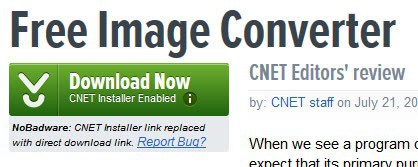
bypass cnet installer

This way it is immediately clear if the download button points to the Cnet installer or the original file that was requested by the user. A click on the button opens the “your download will begin in a moment page” where the originally file is then offered for download.

The userscript has been tested in Firefox and Google Chrome, and it worked in both browsers exactly as advertised. Firefox users need to install Greasemonkey or Scriptish before they can install the userscript in their browser. The userscript may work in other browsers as well.

All in all an excellent script for users who sometimes download software from download.cnet.com and prefer direct downloads. (thanks Vineeth Reedy)


Thursday, November 17, 2011

Gooverbatim, Add Verbatim Button To Google Search

I have already talked about Google Verbatim, a new search tool that is currently rolled out for all users of the Google Search engine. With Verbatim, users can search for contents that match their search query exactly. This means no interpretations by Google, no adding of synonyms, removal of words or personalization of the search results. Search in its purest form so to speak. Google Verbatim gives search engine users the option to either use Verbatim to find exact matches, or trust Google in interpreting the search terms correctly to find better matches this way.

You can follow the link above to read up on the new search tool. You can access Verbatim with a click on More search tools in the left sidebar of a Google search result’s page, and the selection of Verbatim thereafter. Another possibility is to add the parameter &tbs=li:1 to the end of the query to trigger a verbatim search.

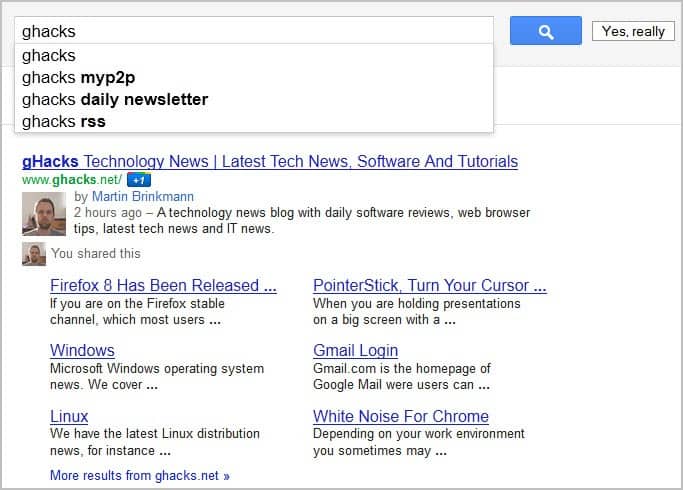
It took less than a day for someone to create a Google Verbatim userscript that places the option more prominently on all Google Search pages. A Yes, really button is added to the Google search form both on the Google homepage and on search result pages. Users can still click on the standard button to perform a search, or they can click on the new Yes, really button to run a verbatim search instead.

google verbatim search

The name Yes, really answers the unasked question whether you really want to search for all the words entered in the search form. The userscript works fine under the Firefox web browser with Scriptish installed, and in the Google Chrome web browser. It should run equally fine for users who have the Greasemonkey extension installed instead. I have not tested the Google Verbatim userscript in the Opera browser or other web browsers.

Interested users can download Gooverbatim from the official Userscripts website.


© Martin Brinkmann for gHacks Technology News | Latest Tech News, Software And Tutorials, 2011. | Permalink |
Add to del.icio.us, digg, facebook, reddit, twitter
Post tags: , , , , ,


Sunday, October 23, 2011

YouTube Link Title, Play Linked YouTube Videos Directly

YouTube videos can be posted as links or as embedded media contents on websites. It depends largely on the technology powering the website if it is possible to embed videos directly. If you look at sites like Facebook or Google Plus for instance, you will notice that they convert YouTube links directly to embedded videos. That’s however not always the case on forums or other large sites such as Twitter.

Probably the biggest issue with linked YouTube videos is the fact that users do not see any information about the video. They see a cryptic url http://www.youtube.com/watch?v=co8IaSS0Z08 and do not know if it is worth watching the video.

The free userscript YouTube Link Title has two core features. It looks up YouTube video urls automatically and replaces their original link text with the video title. See the following two screenshots for a demonstration (first the standard display on Twitter, then the YouTube links with YouTube Link Title installed)

youtube links

twitter youtube link titles

While that does not make it impossible to get rick rolled it certainly aids users in determining whether they would like to watch the video.

The second feature puts an end to pranks and rill rolls though. You can hover your mouse over YouTube links to see a still of the YouTube video. Even better, a left-click on that video link loads the full video right on the third party web page so that it can be played right away without having to visit the YouTube video portal to do so.

youtube videos

YouTube Link Title is a handy userscript for Internet users who encounter direct links to YouTube videos regularly. NoScript users need to enable scripts for the root domain to make the extension work on sites.

I have tested the userscript both in Firefox and Google Chrome, and it worked identical in both. Firefox users need to install Scriptish or Greasemonkey to install the script, Chrome users can install it right away. (thanks Vineeth)


© Martin Brinkmann for gHacks Technology News | Latest Tech News, Software And Tutorials, 2011. | Permalink |
Add to del.icio.us, digg, facebook, reddit, twitter
Post tags: , , , ,