Pages

Showing posts with label microsoft-office. Show all posts

Monday, November 28, 2011

How To Extract Images From Office Documents

Office documents may contain images and other media besides text. I sometimes get article suggestions by email in Microsoft Word format. These articles often contain one or multiple images that I need to extract, since it is not possible to copy and paste them into the article on the Internet as it is with text contents.

Depending on the number of pictures it may be faster to save each manually from within the Office document, or use a third party application like Office Image Extraction Wizard to let the computer do all the hard work. The latter may speed things up considerably if you need to extract images from multiple documents.

You can save images in Office documents by right-clicking them in the Office program and selecting Save as Picture from the context menu.

save as picture

That’s fine if one or two images are embedded in the document. The core benefit of using a software program is that it takes away the tedious process of right-clicking and saving images. Plus, it can be a lot faster.

Office Image Extraction Wizard can extract images and pictures from a variety of formats. It supports the Office formats docx, pptx and xlsx, the OpenDocument Formats odp, ods and odt and the epub and cbz formats.

It unfortunately does not support doc, xls or ppt documents which seems like a big oversight. You can convert those document formats into support formats though.

Office Image Extraction Wizard supports single document and batch document extraction. Just load documents either via drag and drop or the built-in file browser into the interface. The computer desktop is automatically selected as the output directory. You can change that if you prefer a different directory for the images.

office image extraction wizard

The program then extracts all pictures from all documents. Batch mode users have the option to store images in separate folders which may be handy to avoid them getting mixed up. Images are always extracted in their natural format (that is their original format used by the document creator or editor) and without processing or compressing to ensure maximum quality.

Windows users can download Office Image Extraction Wizard from the developer website. The program is compatible with 32-bit and 64-bit editions of the Microsoft Windows operating system.


© Martin Brinkmann for gHacks Technology News | Latest Tech News, Software And Tutorials, 2011. | Permalink |
Add to del.icio.us, digg, facebook, reddit, twitter
Post tags: , , ,


Wednesday, November 23, 2011

Download Microsoft Office Starter 2010

Microsoft Office 2010 is available in different editions just like the Windows operating system. There is Microsoft Office Home and Student 2010 or Office Professional 2010 for instance. And there is at least one version that is only available to OEMs: Microsoft Office Starter 2010. This version is usually only available for users who purchase a computer system at manufacturers who add it as one of the installed software programs that the system ships with.

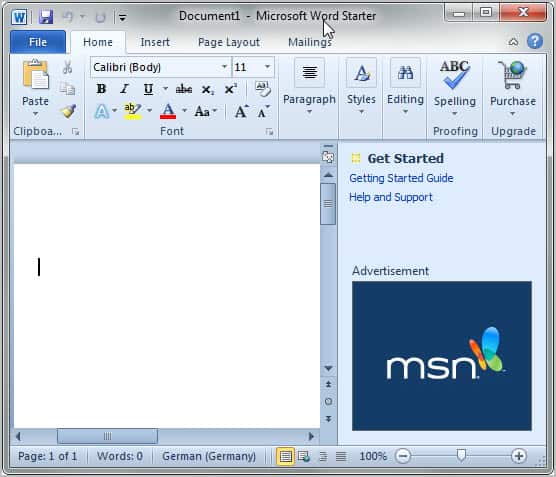
The particular version of Office ships with basic versions of Microsoft Word and Excel, the two most popular programs. It is basically free but comes with advertisement to make up for that.

Office Starter 2010 is not available as a public download. The only way up until now was to buy a PC that ships with it to use it. Caschy now discovered that Microsoft stores Microsoft Office Starter 2010 on their servers. Downloads are publicly available and install the product on compatible systems. Compatible currently means that they will install on Windows Vista and Windows 7, but not on Windows XP or Windows 8.

microsoft office word starter

Here is a list of available versions that you can download:

  • Microsoft Office Starter 2010 English [download]
  • Microsoft Office Starter 2010 French [download]
  • Microsoft Office Starter 2010 German [download]
  • Microsoft Office Starter 2010 Spanish [download]

I only tried those four country codes. It is likely that Microsoft Office Starter 2010 is available in different versions. Just replace the LCID string in the web address, e.g. en-us with another one. You find a list of strings on this page.

Office Starter 2010 can be installed and used without entering a product key. Also interesting: It is possible to create a portable version of Office Starter 2010 from the program’s start menu listing.

Office Starter does not offer all of the functionality that a “full” version of Office offers. It is however a suitable alternative for users who only need to do some light editing and reading.

There are definitely comparable solutions for users who do not want to use Microsoft Office. Among them Open Office, Libre Office or Google Docs.


© Martin Brinkmann for gHacks Technology News | Latest Tech News, Software And Tutorials, 2011. | Permalink |
Add to del.icio.us, digg, facebook, reddit, twitter
Post tags: , , ,


Friday, November 18, 2011

How to get your Microsoft Office Files to Open after Office 2010 Trial Expires in Windows 7

It is good that Microsoft offers a 60 day trial of Office 2010, but once it expires and you try to open Word or Excel Files, you will get an error message stating that it cannot be opened because the file is not a valid Win32 application. Sure, you can rearm the Office 2010 trial up to 180 days, but what do you do after that? Users will not be able to open any Office files until all Office 2010 suite instances are uninstalled. This is an annoying aspect of the Microsoft Office 2010 trial and it is a shame that Microsoft would do something like this. It will be necessary to know the procedure to remedy this issue.

not a valid win32 application

The first thing any Windows user would think to do is uninstall Microsoft Office 2010. This doesn’t work. Files still do not open. This is Microsoft’s way of goading users into buying the Office 2010 suite, which is fine if you want to do so. For users who do not, more steps need to be taken to regain control over the Office suite that you paid for.

When a file association is missing between a file and a corresponding application, various problems occur and the file cannot be opened. This is what happens when the Microsoft Office 2010 trial expires and you do not purchase the suite.

Click the Start menu and open the control Panel. Select Uninstall a program.

Scroll to find the instances of Microsoft Office 2010. Uninstall all instances of Office 2010 and you should be prompted to restart your computer. Restart as suggested.
The problem will most likely remain unsolved due to the instance of the Microsoft click-to-run application. Use the same steps to uninstall click-to-run (you don’t need it) and restart again.

Try opening a .doc, .docx, or .xml file and see if you get the same error message. You probably will because the default application to open the file has not been changed. Open the Control Panel again and click on Programs (indicated in green). This will open the Programs options. Under Default Programs, click “Make a file type always open in a specific program”.

default programs

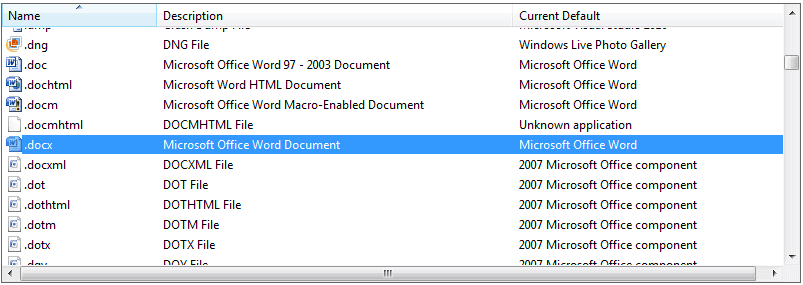
A list of all file associations will be presented. Scroll down to .doc, .dochtml, .docx, etc.

docx

The screenshot above shows the default applications to which you will need to change the file type to. This demonstration uses Office 2007. Change doc, dochtml, docm, docx and docmhtml files to Microsoft Office Word as the default application. Do this by double clicking each one individually and changing the file association. Change docxml, dot, dothtml, dotm, dotx and dqy file associations to the appropriate Microsoft Office component, which would be Office 2007 in this case (ideally in any case).

Files should open properly now. The process is slightly different for XP and Vista, but this should give you a good idea of how to approach this issue. There is absolutely nothing wrong with switching to Office 2010 if you want to. If you do, all of the above steps will be unnecessary. However, Windows 7 users who have encountered this problem will find this useful.


© Melanie Gross for gHacks Technology News | Latest Tech News, Software And Tutorials, 2011. | Permalink |
Add to del.icio.us, digg, facebook, reddit, twitter
Post tags: , , ,


Wednesday, November 9, 2011

OPA Backup, Microsoft Office Activation Backup

When you reinstall the Windows operating system you may need to reinstall other software like Microsoft Office as well. It may then be necessary to activate the software again which may not be a big problem in most cases, but might be one if the computer Office was reinstalled on has no permanent Internet connection. One option if Office has been reactivated before is to make a backup of that activation to restore it after the reinstallation of the Office suite on the new installation of Windows.

OPA Backup (which stands for Office-Produktaktivierung Backup, German for Office product activation backup) is a free portable software for the Windows operating system that can backup and restore the activation of Office on a computer system.

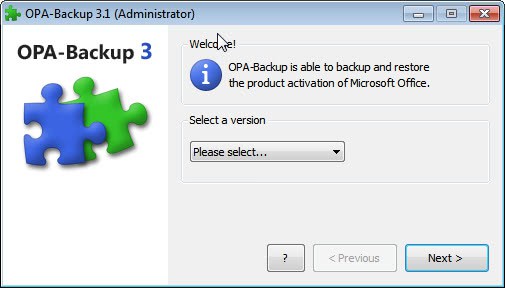
To backup, Microsoft Office needs to be activated on the system. The program won’t work if it is not. When you first start the program you may be asked to run it with administrative privileges. The main interface of OPA-Backup then displays a pulldown list where the installed version of Microsoft Office needs to be selected.

opa backup

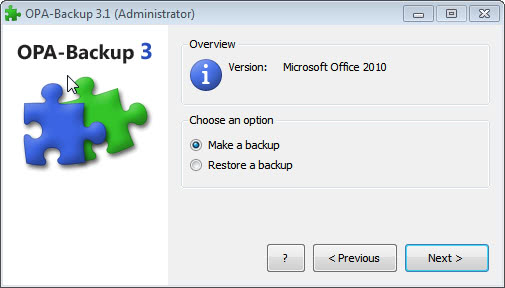
The program does not support auto-detection of the installed Office version. The user then has the option to make a backup of the Office activation on the system or to restore a previously recorded backup.

office activation backup

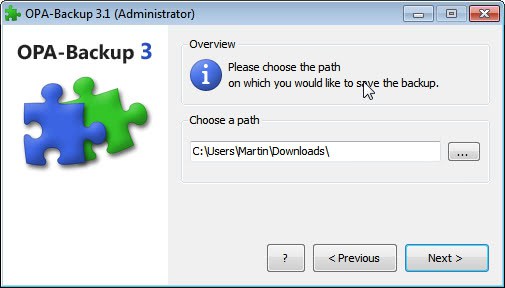
The backup path has to be selected on the next screen. The program displays a warning if a folder is selected that is part of the current Windows installation as it may be removed during a new installation of the operating system.

microsoft office backup

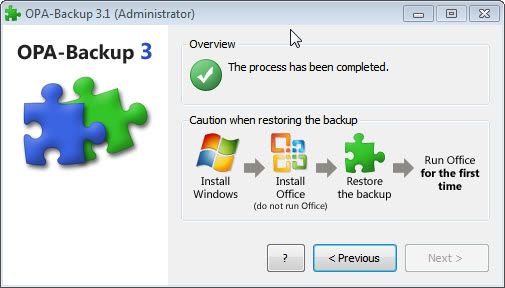
A status report is then displayed on the final screen of the backup or restoration process.

office backup

The process is nearly identical if the restore Office authentication option is selected.

The software can be handy in situations where Office cannot be re-activated over the Internet.

OPA-Backup supports all recent versions of Microsoft Office, including Office 2010. The software requires the Microsoft .NET Framework 3.0 on the system. The program can be downloaded from the developer website.


© Martin Brinkmann for gHacks Technology News | Latest Tech News, Software And Tutorials, 2011. | Permalink |
Add to del.icio.us, digg, facebook, reddit, twitter
Post tags: , , , ,


Wednesday, October 26, 2011

Microsoft Office 2007 Service Pack 3 Released

Microsoft yesterday has released Service Pack 3 for their Microsoft Office 2007 suite. The update applies to both Office 2007 as we as Microsoft Office Project, Microsoft Office SharePoint Designer, Microsoft Office Visio, and Visual Web Developer.

The third service pack includes two main categories of fixes. The service pack includes all public updates, security updates, hotfixes and other updates that were released for Office 2007 through September 2011. It also includes fixes that were made specifically for the service pack. This includes according to Microsoft “general product fixes and improvements in stability, performance and security”.

Microsoft Office 2007 Service Pack 3 is a cumulative update, which means that it includes all fixes that were part of Service Pack 1 or Service Pack 2 for Office 2007. Office users and administrators can install the third Service Pack release to apply all patches to the software.

The service pack can be downloaded via Windows Update or Microsoft Update automatically, or manually from Microsoft’s Download Center.

The following
link points to the download of the 2007 Microsoft Office Suite Service Pack 3 (SP3) on Microsoft’s Download Center. The Office Language Pack 2007 is available as an alternative download as well. Please note that there is only one version of the service pack available (no 32-bit and 64-bit edition).

The core improvements are the following ones:

  • Documents that require custom security trimming are not returned from alert search queries, even if the user who created the alert could see and query for these documents.
    Non-Unicode characters in certain error message strings now display correctly.
  • Four new bibliography styles are now available in the “Word Citations & Bibliography” feature: Harvard Anglia, IEEE, APA Sixth Edition, and MLA Seventh Edition.
  • Chinese New Year holiday is now included in the Outlook calendar for Singapore.
  • Fixes an issue in which Excel 2007 sometimes crashes when you open an Excel workbook previously saved in a newer version of Excel. This occurs if the file uses a new feature that is not available in the 2007 Office system.
    Fixes issues with the Pre and Post Reform rules in the French Thesaurus.
  • Fixes an issue in which encryption settings are not configurable when they are used with a file format compatibility pack converter and Office 2003 or an earlier version of Office.
  • Fixes an issue in which a crash sometimes occurs when an Excel workbook is opened in Excel and then previewed by using the Windows Explorer preview pane feature.
  • Fixes an issue in which Excel Slicers and Ribbon customizations are lost when an XLSX file is first saved as an ODS file, and then saved as an XLSX file in Excel 2007.

Office users and administrators who notice issues after installing the service pack can use Microsoft’s Service Pack Uninstall Tool for the 2007 Microsoft Office suite to uninstall the service pack without affecting the core Office 2007 installation.


© Martin Brinkmann for gHacks Technology News | Latest Tech News, Software And Tutorials, 2011. | Permalink |
Add to del.icio.us, digg, facebook, reddit, twitter
Post tags: , , , ,