Pages

Thursday, November 3, 2011

Control Applications and End Processes with Daphne

Windows Task Manager allows us to monitor processes, services, and running applications and also provides control over these so they can be voluntarily ended if needed. There is a replacement for Task Manager that offers more and takes it to the next level, enabling you to end processes at a predetermined time. This replacement is software called Daphne. With Daphne, you can set applications to run always-on-top, alter priorities of processes and threads, and features an online search for information on unknown processes from a database at drk.com.ar. The features of Daphne don’t stop there. It is an incredible application with which you can include different traps, add items to the kill menu and integrate with the Windows context menu. You can identify and copy the path and name of process properties in detail from a clear view that also highlights processes using more memory than the allotted limit. There are a number of other features besides process management to top it all off.

If this sounds like something you want to try out, you can download Daphne for free from this link:

The setup is typical and the parent folder will be found in Windows\Program Files(x86). You can choose to open the application after setup or use the desktop icon to open it later.

daphne windows task manager

You can view %CPU, PID, Process, Path (where specified), Owner, Priority, Class, Memory occupation, Peaks, Swap, Thread, I/O reads and I/O writes. This is all displayed in the main window and the options panel is at the bottom of the window.

The dropdown menu gives you the different actions that you can apply to specific processes. Select the action you want to execute and then drag the icon to the left of the search box and drop it on the process to which you will apply the action.

Windows Task Manager begins to look very limited in comparison to the functions of Daphne. You can use the right-click context menu to choose a variety of options for actions. An interesting feature to demonstrate as an example is the ability to kill a process at an application or process at a particular time, select the process and right-click and choose “Kill at” from the context menu. You may then set the date and time to kill the application. In this example, Yahoo Messenger is selected to be killed at a specific time. This is useful for stopping this application when you don’t want to use it anymore. It is a good application, but the pop-up messages can get annoying after a certain period of time and it is convenient to have it stop automatically.

task manager

Use the Settings button in the bottom pane to customize different options such as startup behavior, setting traps, enable Windows Explorer integration, and advanced settings configuration. Highlight the process or application that you want to set options for and click the Settings button to access these options.

windows task manager replacement
Click the Daphne button to see hidden applications, schedule system shutdown, show installed software, etc.

Daphne is quite versatile and easy to learn. It is compatible with Windows XP, Windows 7, and Vista for 32-bit and 64-bit versions. It certainly offers a level of control that exceeds that of Windows Task Manager alone.


© Melanie Gross for gHacks Technology News | Latest Tech News, Software And Tutorials, 2011. | Permalink |
Add to del.icio.us, digg, facebook, reddit, twitter
Post tags: , , ,


Wednesday, November 2, 2011

Tab Position Customizer For Google Chrome

Tabbed web browsers like Google Chrome, Firefox, Opera or Internet Explorer have specific orders in which tabs are opened and closed. Developers have to configure orders for opening blank pages and links as well as activation rules when users close tabs. The default behavior of most browsers opens blank tabs on the rightmost side of the tabbar, links to the right of the active tab and activate the last used tab after closing a tab.

Some users may prefer a different order of things. Someone with one hundred or more open tabs would not necessarily want a blank tab opened at the rightmost location of the tabbar as it is easy to lose the orientation this way.

The Google Chrome extension Tab Position Customizer empowers the user to select the tab order. In particular it is possible to select the tab opening position, the new tab behavior and the behavior after closing a tab in the Google browser.

Here are the available options:

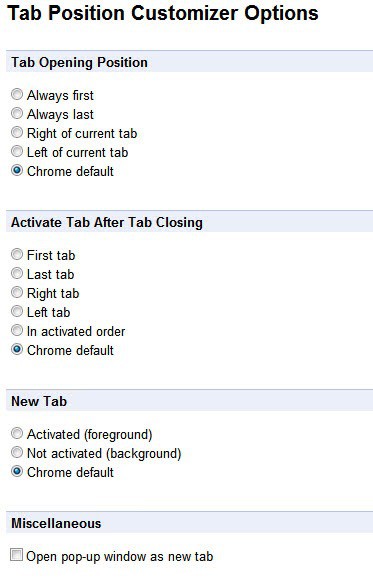
  • Tab Opening Position: Always first, Always last, Right of the current tab, Left of the current tab, Chrome default
  • Activate Tab After Tab Closing: First tab, Last tab, Right tab, Left tab, In activated order, Chrome default
  • New Tab: Activated (foreground), Not activated (background), Chrome default

As you can see, there are lots of options to configure the tab opening and closing behavior in Google Chrome.

chrome tab position customizer

Chrome users need to open the extension’s options via the Wrench > Tools > Extensions > Options menu first to make the changes to the tab behavior in Chrome. The changes made on the configuration screen are active immediately which is handy for testing purposes.

The Tab Position Customizer extension empowers Chrome users to pick the tab opening and closing behavior that they want. You may have noticed that the extension has another option under Miscellaneous which configures Chrome to open pop-up windows always as new tabs in the same browser window.

Chrome users can download the extension from the official Google Chrome Web Store.


© Martin Brinkmann for gHacks Technology News | Latest Tech News, Software And Tutorials, 2011. | Permalink |
Add to del.icio.us, digg, facebook, reddit, twitter
Post tags: , , ,


Google Retires Google Buzz

Google Buzz was a social networking service that Google integrated into the company’s web-based email product Gmail. Google Mail users were able to make use of Buzz to share messages, photos, videos and other information with their Gmail contacts or the public. Google Buzz was a first attempt to compete with successful social networking sites such as Facebook and Twitter.

Buzz’s was heavily criticized for its default privacy settings in the beginning which revealed names of Gmail contacts publicly or the exact location of a mobile user who posted updates on Buzz.

Google made the decision to retire Google Buzz shortly after the release of the new social networking site Google+. The decision was announced on October 14 that Google Buzz would be shut down along with the Buzz Api in a few weeks time. A Google Buzz help page explains the consequences of retiring the service.

Google Buzz is going away, but your posts are yours to keep

In a few weeks we’ll be retiring Google Buzz. At that time you won’t be able to create any new posts, but your existing content will remain accessible [..]

There are two locations where Google Buzz users can access their past messages and posts. First in the Google Profile under the Buzz entry

google buzz

Here you see all posts of Buzz users as well as comments and likes if you are the owner the the Google+ profile.

The second option is to use Google Takeout, Google’s data exporting service, to download Google Buzz data to a local computer system. Google Takeout can be accessed here.

google takeout buzz

The service generates a file and size listing of the Google Buzz data. The scan may take a while depending on the number of posts a user has made on Google Buzz. A click on create archive prepares the selected data so that it can be downloaded to the local system in the end. Each post on Buzz is stored as a html document inside a zip.

Have you been using Google Buzz? (thanks Roman Sharp for the tip)


© Martin Brinkmann for gHacks Technology News | Latest Tech News, Software And Tutorials, 2011. | Permalink |
Add to del.icio.us, digg, facebook, reddit, twitter
Post tags: , , ,


Game Downloader, Download Free PC Games

I remember that both the Commodore C-64 and the Amiga had a thriving public domain, demo and freeware scene. While it was overshadowed by commercial games and applications, it was there and some of the games produced by enthusiasts were well done. If you look at the PC you will find that freeware games and games developed by independent developers are on the rise in last years. While most games cannot be compared visually with full priced computer games, some reach the same level of quality in areas like gameplay or story. Especially flash based games have made a huge leap forward in terms of quality.

Windows users who want to keep up to date with recent developments need to find ways to do so. They can follow specialized sites like Indiegames, YouTube video channels like that of The Cynical Brit or the Game Saturday series here on Ghacks.

But even if you follow several channels you will probably still miss out on some of the better games. Game Downloader is a free software for Windows that is more a less a constantly updated game download manager for free Windows PC games.

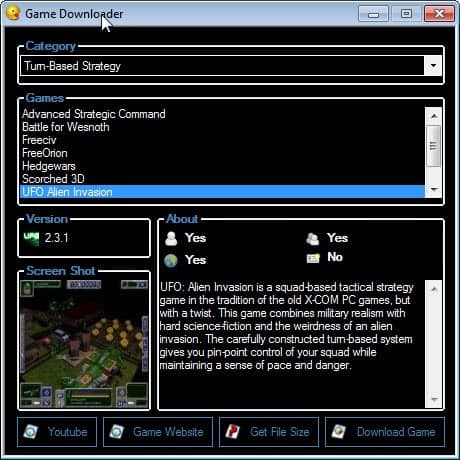
The portable application displays a listing of popular free games in various categories that can be downloaded directly from within the program’s interface.

pc game downloader

You pick a game category first. Available in the pulldown menu are game types such as turn-based strategy, puzzles, board games, first person shooters and sports games.

The list of available free games is the populated after the category has been selected. Each game is displayed with its version, a screenshot and game information. There are also links to YouTube, the game developer website, options to get the file size and to download the game.

Many great free Windows games are listed here, from Battle of Wesnoth and Freeciv in the turn-based strategy game section over Warsow and OpenArena in the first person shooter category to popular card and board games like Risk, Solitaire and Poker.

It is obviously possible to find and download the games manually on the Internet. The biggest achievement of the program is that it makes the whole process more comfortable. Plus, it offers all the information necessary to decide whether playing a particular game could be fun (including online and multiplayer)

Game Downloader on the other hand has a few shortcomings. A search is missing, as are detailed information like compatibility or sub-genres. It would have also been nice if the program would offer to download all games from a selected category automatically. The Pc game downloader furthermore does not highlight games that have already been downloaded or installed previously.

Windows users who want to dive deeper into the freeware games scene can use Game Downloader with its 100+ free games as a starting point. The program can be downloaded from the Sourceforge project website. (via)


© Martin Brinkmann for gHacks Technology News | Latest Tech News, Software And Tutorials, 2011. | Permalink |
Add to del.icio.us, digg, facebook, reddit, twitter
Post tags: , , , , ,


Duqu Zero-Day Exploit Discovered, Removal Tool Released

If you have been following security news lately you may have already heard about the Duqu rootkit that combines the technology of the Stuxnet rootkit with a backdoor trojan and keylogger. Duqu has been discovered on October 18 and infection reports have started to come in soon thereafter.
Not all security suites and products detect the Duqu rootkit right now which, in combination with the fact that it exploits a zero-day vulnerability in Windows, makes it a very dangerous threat. Microsoft is currently working on a patch to protect systems from the vulnerability (which would make further infections on patched PCs impossible)

Rootkit.Duqu.A is digitally signed (with a stolen and revoked certificate) which means that it targets not only 32-bit Windows systems but also 64-bit editions of the Microsoft Windows operating system. According to information posted by Bitdefender, Duqu runs for 36 days on a computer collecting information entered via the keyboard. This may include passwords, emails, conversations, logins on popular sites and even banking and credit card information.

Symantec has posted additional information about Duqu’s installer. According to Symantec’s information, Duqu is spread as a Microsoft Word document that exploits a Windows kernel vulnerability that allows code execution. When a user opens the Word document the malicious code is executed and Duqu is installed on the system.

Duqu infections have already been confirmed in countries such as France, Switzerland, India, the United Kingdom, Austria and the Netherlands.

Symantec has released a whitepaper in pdf format that contains all known details up to this point.

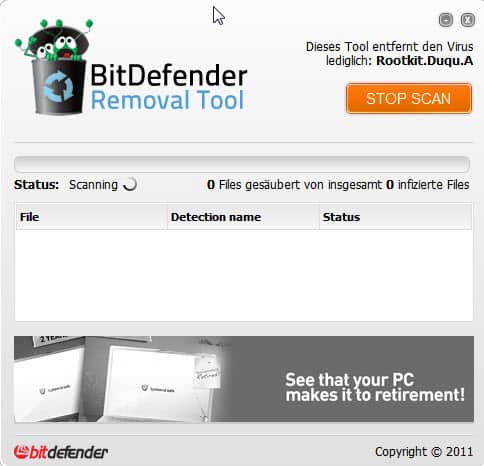
Windows users who want to make sure that their system is clean and not infected by the Duqu rootkit can use Bitdefender’s Removal Tool to scan the system and if necessary disinfect it.

duqu rootkit removal

The portable rootkit remover can be downloaded from an official Bitdefender website. All that Windows users need to do is to click on the Scan button to start the scan. The program will list any files that have been identified to be part of the Duqu rootkit. Please note that the program may require elevated rights on some machines.

Is there a way to protect your computer in the meantime? Yes, do not open Word documents locally. Use an online document viewer like Google Docs or Docs.com for that. (via)


© Martin Brinkmann for gHacks Technology News | Latest Tech News, Software And Tutorials, 2011. | Permalink |
Add to del.icio.us, digg, facebook, reddit, twitter
Post tags: , , , ,


Google+ Gets Send A Message Button For Easier Sharing

If you are a regular on Google’s social networking experiment Google+ you have noticed that the company makes changes to the site constantly. Sending messages to other Google+ users was something that you could do in two ways in the past. You could use the send an email option to contact a Google Plus user via email, or write a message on Google+ and restrict the visibility of the message to that single user.

This was not the most comfortable thing to do, but the only option to send a direct private message to another user on Google+.

Users receive notifications if they are the sole recipient of a direct message on the social networking site.

To send a message to just one user on Google+, one had to remove the public visibility button and add the individual manually to the list of recipients.

google+ send private message

The recipient could reply by re-sharing the message with the sender.

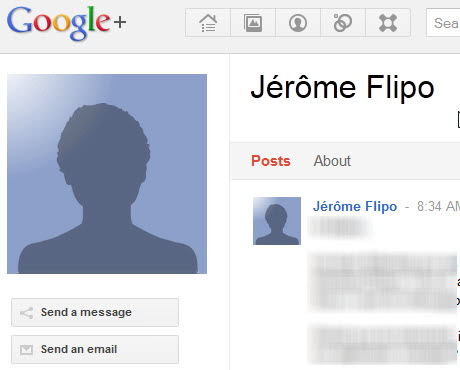
Google yesterday made a change to the social networking site that made it easier to send individual users a direct message. Users need to click on the name of the user or organization that they want to contact directly. This opens the user profile on Google+. The new button send a message has been placed directly beneath the profile picture of the user.

google+ send a message

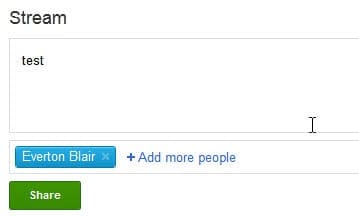
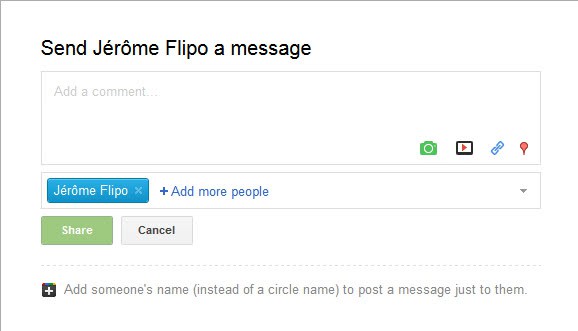
A click on the Send a message button opens the share a message form in an overlay on the screen. It is practically the same form that you would have used in the manual process.

send a message

The recipient is already included and all that is left to do is to enter the message and click on the share button.

The option to share with just one user on Google+ is still available. Some users may prefer the manual way as it can be faster than loading the user’s profile and clicking on the Send a message button.

Have you used Google+ yet? What’s your impression so far?


© Martin Brinkmann for gHacks Technology News | Latest Tech News, Software And Tutorials, 2011. | Permalink |
Add to del.icio.us, digg, facebook, reddit, twitter
Post tags: ,


Leaked Microsoft Roadmap Reveals Windows 8, Windows 9 Release Dates

All experts are fairly certain that Microsoft will release the Windows 8 operating system in 2012, as it was confirmed by Steve Ballmer back at the Microsoft Developer forum in Tokyo in May 2011. Only the month when the company first starts shipping it is highly discussed. The majority thinks that Microsoft will reveal the Windows 8 beta during CES 2012 in January.

A leaked roadmap suggests now the following Windows 8 timeline: Windows 8 and WinStore will be revealed as betas during the CES 2012 in January. January will also see a community technology preview of an online market and the first Tango update for Microsoft’s Windows Phone.

According to the roadmap, the Windows 8 release candidate will be revealed during MIX 2012 which like last year will be held in April again. The very same month will see the beta of the online market, Tango2 launch, Apollo announcement and the release of the Kinect commercial SDK.

At E3 2012 in June, Microsoft will release the Windows 8 RTM (release to manufacturing) along the Xbox SDK, Apollo SDK and 3G Kinect games.

Windows 8 will finally ship two month later in August 2012 along with the online market, Windows Phone 8 and the Xbox Store. Here are the details again in an overview:

  • September 13, 2011: Windows 8 Developer Preview
  • January, 2012: Windows 8 Beta
  • April, 2012: Windows 8 RC
  • June, 2012: Windows 8 RTM
  • August, 2012: Windows 8 Retail

The roadmap surprisingly does not end there. If you look further down the line you will notice several interesting release dates. Microsoft will for instance release Internet Explorer 11 during Mix 2013, Xbox Loop during the E3 2013 (the next Xbox version) and Windows 9 Developer Preview during Build 2013 (probably in September). The beta of Windows 9 is then revealed during CES 2013, the RC during Mix 2014, the RTM during Build 2014 and the final version in November 2014 along with Windows 9 Mobile and the Kinect HP2 launch.

  • CES 2014: Windows 9 Beta
  • Mix 2014: Windows 9 Release Candidate
  • Build 2014: Windows 9 RTM
  • November 2014: Windows 9 Release

It is interesting to see that Microsoft plans to release Windows 9 only two years after the company released Windows 8 to the public. Organizations, companies and individuals who know the release dates may be inclined to sit this one out and wait for the next release which is just around the corner. That is, if the roadmap is legit.

What’s your take on the leaked roadmap? (thanks Venkat)


© Martin Brinkmann for gHacks Technology News | Latest Tech News, Software And Tutorials, 2011. | Permalink |
Add to del.icio.us, digg, facebook, reddit, twitter
Post tags: , , , , , ,