Pages

Saturday, November 5, 2011

How To Restore Firefox Bookmarks

One of the things that I migrate to new computer systems that I build or but are my bookmarks. I have a collection of a few hundred sites in my bookmarks that I use regularly thanks to browsers recommending bookmarks when entering text into the address bar.

A corrupt or accidentally deleted bookmarks file could have a serious impact on my work day. Most modern web browsers come with synchronization and backup options that can be used to restore data in the browser. The majority of those features need to be activated though before they can be used to restore data.

Firefox users who cannot access all or part of their bookmarks anymore can make use of the browser’s built-in restoration option to restore bookmarks in the browser. This feature is enabled by default. Here is how it is done.

Use the keyboard shortcut Ctrl-Shift-b to open the bookmarks manager. Locate the Import and Backup menu at the top and click it to display its menu options.
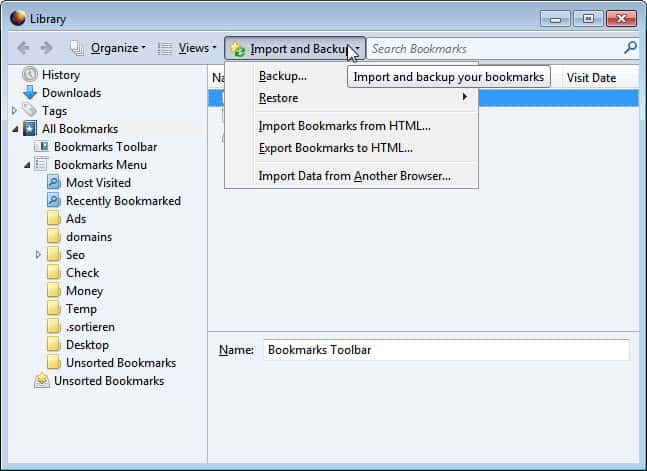
firefox restore bookmarks

Move the mouse cursor over the Restore menu to display a list of bookmark backups that can be restored. Firefox by default backs up the bookmarks once per day (if the browser is used).
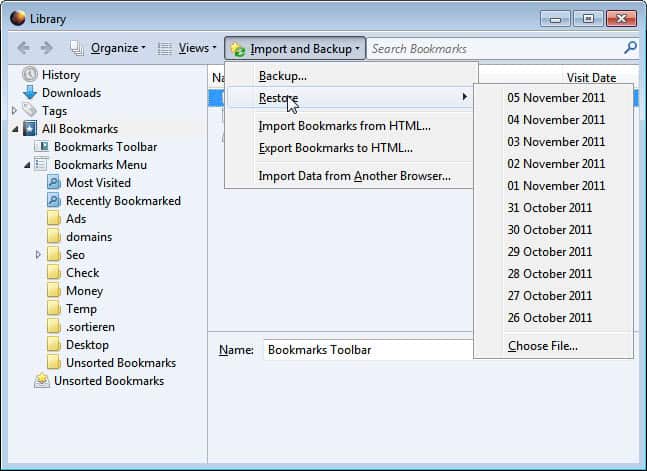
restore firefox bookmarks

Click on a data to restore that bookmarks backup in the browser. Please note that Firefox will overwrite the existing bookmarks with the backup. Bookmarks that you have added in the meantime will not be available once the restoration has completed.

Firefox users can make use of the export bookmarks to HTML in the same menu to create a manual backup of their current bookmarks file. It is always a good idea to backup the file before restorations. This manual copy can then be restored by selecting the Import bookmarks from HTML option in the same menu.

Bookmarks can also also be backed up as JSON files instead by selecting the Backup option of the menu. These bookmark backups can then be restored via the Restore > Choose File option.

Firefox users can alternatively configure the synchronization option under Tools > Set Up Sync to synchronize the bookmarks with a cloud server.

Have you ever lost bookmarks in Firefox? What did you do to restore them?


© Martin Brinkmann for gHacks Technology News | Latest Tech News, Software And Tutorials, 2011. | Permalink |
Add to del.icio.us, digg, facebook, reddit, twitter
Post tags: , , ,


SSDLife Free, Show Life Expectancy Of Solid State Drives

Solid State Drives are slowly becoming the new mainstream storage devices. It may still take a few years before they replace platter based hard drives but it will happen eventually. Currently both price and storage volume are not competitive, but this will change in the future. PC users who followed SSDs from the very beginning may still have stories about bad life expectancy and locked storage in their mind. The first retail generation of solid state drives had lots of issues in this regard.

With newer generation drives those factors have been mitigated or eliminated completely. Still, some PC users may need to check on their SSDs from time to time to make sure that they provide the same performance and reliability as in the beginning.

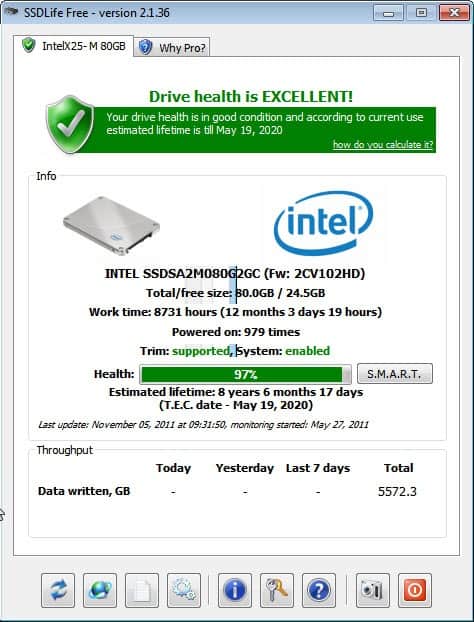
SSDLife Free is a Windows software program that can check the life expectancy of a solid state drive. It interprets the SMART data of the drive. The free version of the program supports only one connected SSD. If more than one drives are connected only the first will be analyzed and displayed.

ssd drive health live expectancy

When you start the program for the first time data about the first SSD of the system is collected and then displayed on the screen. This includes a general drive health rating at the top with the estimated lifetime of the solid state drive. The information are more detailed in the middle of the window. Here you see your drive’s model, the total drive space and free space, the work time in hours and days and the times the drive has been powered on.

The program displays furthermore if TRIM is supported by the drive, and the estimated life expectancy in more detail. Lastly, it also displays how much data was written in Gigabyte in the SSD’s life.

The expected lifetime is handy to know, as it allows users to make preparations to replace the drive when the time of “death” comes nearer.

SSDLife Free can display the SMART data of the drive in an online report in the web browser.

Users with one Solid State Drive installed on their computer can download the free software from the developer website.


© Martin Brinkmann for gHacks Technology News | Latest Tech News, Software And Tutorials, 2011. | Permalink |
Add to del.icio.us, digg, facebook, reddit, twitter
Post tags: , , ,


Mozilla Profile Manager Final Released

You may already know about Mozilla’s plan to retire the built-in Firefox profile manager to replace it with an external program called the Profile Manager. This new program, available for all supported operating systems that Firefox runs on is not only compatible with the web browser but also with other XULRunner-based applications like Mozilla Thunderbird or Seamonkey.

The built-in profile manager has been used by Firefox users to configure and run multiple user profiles on the same computer. This was helpful for web developers for instance who wanted to separate work from their regular browsing (no need to run slow loading applications like Firebug under the regular profile).

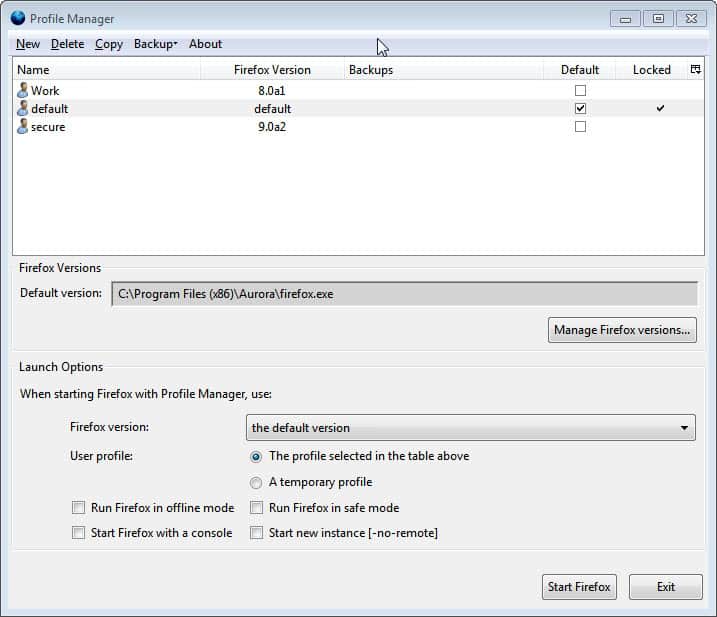
The new standalone version of the Mozilla Profile Manager improves upon the built-in tool. The program detects all installed Firefox versions automatically and displays them along with their associated user profiles in the application window.

mozilla profile manager

Users can add portable program versions to the application. This is done with a click on the Manage Firefox versions button and the selection of Add in the new window. This makes it possible to add portable versions of the browser to the profile manager.

add firefox

The profile manager indicates the default profile in the interface as well. One of the interesting features here is the ability to link user profiles to specific Firefox versions.

Another new feature is the ability to run Firefox with a temporary profile that’s created for the session. This profile gets deleted once the browser is closed.

When you look at the options you will notice that there are four to select from.

  • Rin Firefox in offline mode – Starts the browser in offline mode without Internet connection.
  • Run Firefox in safe mode – Starts the browser without add-ons, settings or themes.
  • Start Firefox with a console – Loads a console with Firefox
  • Start new instance – Can be used to run two instances of Firefox with different user profiles at the same time.

The Profile Manager can be used to backup and restore some or all profiles on the current computer system. It is in addition possible to create a new profile or copy an existing profile.

The profile manager is configured for the Firefox browser by default. Thunderbird or Seamonkey users need to use a command line argument to change that. This is done by adding the name of the program to the command, e.g. profilemanager thunderbird to manage all Thunderbird profiles on the system.

Wonder why Mozilla is pushing for the change? Mozilla employee Benjamin Smedberg has this to say about it:

Startup time is *not* a reason for this change. The code complexity of named profiles and their poor interaction with OS integration and remoting features is the primary reason for this change.

The new profile manager makes it easy to link profiles to versions of Firefox which makes it easier to work with multiple profiles and multiple versions of the browser on the same computer and under the same user account.

The Mozilla Profile Manager can be downloaded from the official Mozilla ftp site. (via)

What’s your take on the new Mozilla Profile Manager?


© Martin Brinkmann for gHacks Technology News | Latest Tech News, Software And Tutorials, 2011. | Permalink |
Add to del.icio.us, digg, facebook, reddit, twitter
Post tags: , , ,


Waterfalls 3 [Game Saturday]

Looking for a relaxing fun puzzle game for the weekend? Than the Flash game Waterfalls 3 may be exactly what you are looking for. It is the player’s task to redirect color streams to fill all the white circles on the map with those colors. The game begins easy with one or two color streams and only a few elements to redirect them.

Available for selection are elements that redirect a color stream to a specific direction (e.g. right or down), that split color streams or teleport them to another exit. Most elements can be placed with the mouse at another location on the screen. Some elements on the other hand are fixed at their position which adds to the difficulty of the level.

waterfalls 3

The game comes with a level selector to select unlocked maps directly. In the beginning though you are stuck with level 1 and need to work your way towards level 25, the last level of the game.

The puzzle game is not overly difficulty, but that was not probably the intention of the game developer. It is a relaxing and entertaining puzzle game for players of all ages. I’d estimate that experienced players may need about 20 minutes to play through all the 25 levels of the game. Those that cannot get enough can load the predecessors of the game to continue playing. The first two parts of the game are linked from Waterfall 3 directly. Players who are stuck can lock at the walkthrough videos that demonstrate how elements need to be placed in each level to beat it.

Music and visuals are excellent. The game itself could use maps that are more difficulty to master. Interested gamers can play Waterfalls 3 directly at the Kongregate website. The game requires Adobe Flash Player to be installed as a plugin in the browser.


© Martin Brinkmann for gHacks Technology News | Latest Tech News, Software And Tutorials, 2011. | Permalink |
Add to del.icio.us, digg, facebook, reddit, twitter
Post tags: , , ,


Using Free File Unlocker to Release OS-Locked Files and Folders

The Windows operating system automatically locks files and folders that are being used by an application or any native Windows service. Stopping services or closing the applications that are locking the file or folder is not always an option. The familiar message, “Cannot delete file: It is being used by another program” can be an annoyance when you are trying to modify the name of the file, move it or delete. Free File Unlocker is a utility that allows you to release files and folders that are in use so that you can make the desired modifications or delete the file or folder altogether. You can use it to view all locked files and folders on your computer and manage them. By selecting a folder, you can instantly see a listing of the files causing the error. Using File Unlocker, you can unlock files and/ or kill the processes locking the file. Another interesting feature this utility offers is the ability to terminate viruses, Trojans, and other malware that are not being removed by standard methods.

Download Free File Unlocker from the following link:

When you see any of the error messages below, this is when you can use Free File Unlocker to gain access to files and make the desired modifications. Free File Unlocker is intended for advanced users. These error messages are specified on the readme.txt file that opens after you install the utility.

  • Cannot delete folder: It is being used by another person or program
  • Make sure the disk is not full or write-protected and that the file is not currently in use
  • Cannot delete file: Access is denied
  • The file is in use by another program or user
  • There has been a sharing violation
  • The source or destination file may be in use
  • Cannot read from the source file or disk

Please note that we have reviewed comparable programs in the past, including IOBit Unlocker and the mother of it all Unlocker.

free file unlocker

You will see the Locked File / Directory bar at the top of the user interface where you can specify the path for the Locked file or folder. Click the Select button to the left of the path field to choose between File or Directory and All Locked Files or Directories. The details will appear in the main field of the interface.

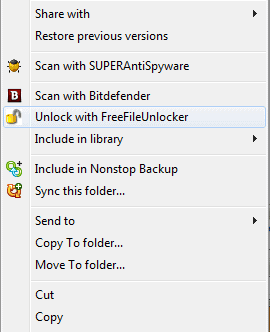
Select the file that needs to be unlocked and click Unlock in the right pane. If you want to unlock all locked files or directories, click Select and choose All Locked Files or Directories and then click Unlock All. You can also use the right-click context menu to unlock specific files without even using the main interface, as the option is integrated into the Windows context menu.

unlock file

It is important to note that files are locked by Windows for a reason; otherwise it would not be a standard Windows default. You should have a complete understanding of the effects that unlocking a file will ultimately yield. This means Free File Unlocker is intended for advanced users and should not be used frivolously. The only time it is reasonable to use this utility is when user-initiated services and applications are blocking access to files and folders. You should not use the “Unlock All” option unless you are an advanced user and understand the implications. It was only mentioned in this article to give you an idea of the scope of options that this utility offers.


© Melanie Gross for gHacks Technology News | Latest Tech News, Software And Tutorials, 2011. | Permalink |
Add to del.icio.us, digg, facebook, reddit, twitter
Post tags: , , ,


Friday, November 4, 2011

NetSurveyor, Network Discovery Software

One of the things that you may want to consider when setting up a wireless network connection or troubleshooting an existing one is the vicinity of other wireless signals in the area. Why? Because you may want to make sure you get the best possible network quality. It is for instance advised to select wireless channels that are not used by other users near your location.

NetSurveyor is a free wireless network discovery software that collects and processes information about wireless access points in real time. The program can be used for multiple purposes, including:

  • Making sure the wireless network is properly set up, that antennas and wireless receivers are positioned for maximum efficiency and reliability.
  • Troubleshooting an existing wireless network, for instance if users connected to it experience poor network performance or interruptions.
  • Analyzing all existing wireless networks in the vicinity.

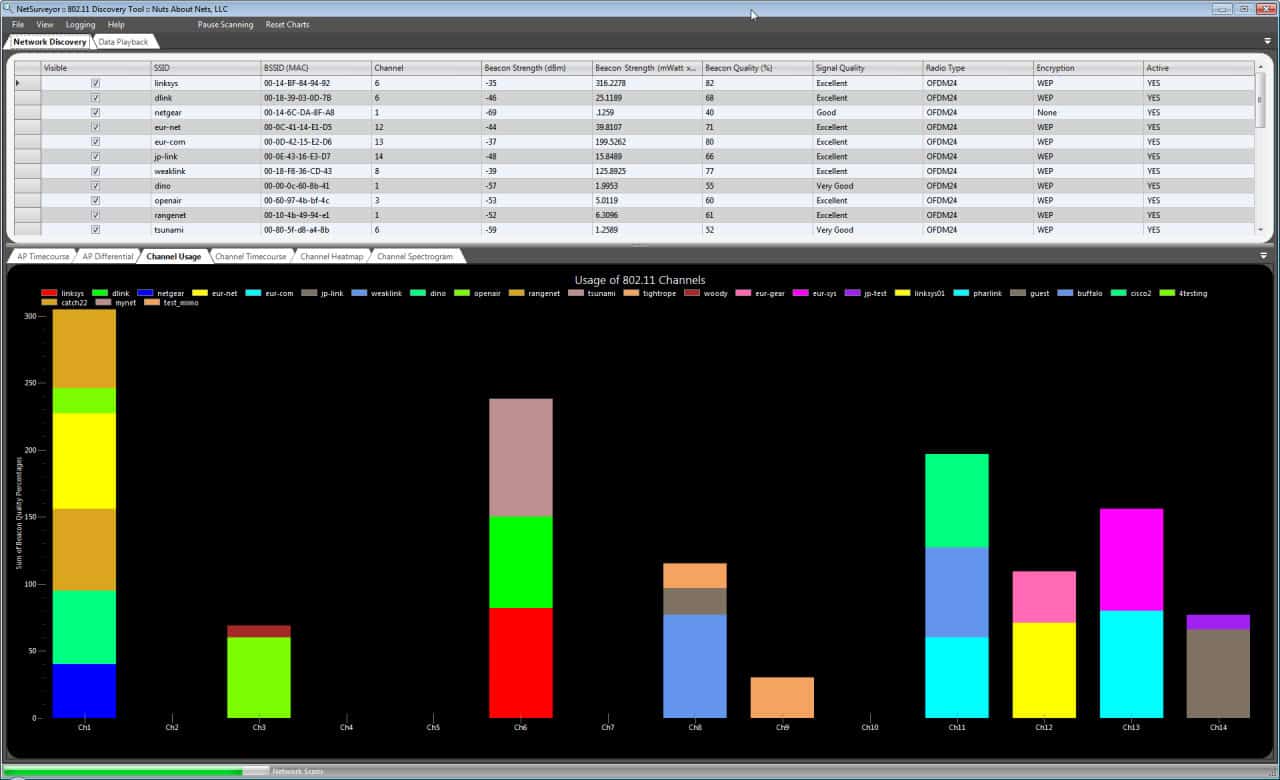
The software scans for wireless access points and traffic on startup. All access points that it discovers are displayed in a list at the top.

netsurveyor network discovery software

All are listed with their SSID, visibility, MAC address, channel, beacon strength, encryption, signal quality and various other parameters. Graphs below visualize the data. The graphs are divided into tabs in the interface. This includes channel usage and a channel heatmap, a channel spectogram and access point timecourse and differentials.

NetSurveyor is a diagnostic tool that falls under the category of WiFi Scanners or 802.11 Network Discovery Tools. The best known in this category is NetStumbler. A discovery tool reports the Service Set Identifier (SSID) for each wireless network it detects, along with the channel used by the access point (AP) servicing that network. The way this works is that roughly every 100 mSec an AP sends an “I’m here” beacon – and the discovery tool (running on your laptop and using its 802.11 wireless adapter, also known as a station or STA) picks-up that beacon and adds the SSID to its list of known wireless networks. In addition, the discovery tool reports the RSSI (Received Signal Strength Indication) for each AP, which is roughly an indication of how close the AP is to your current location (i.e. how close it is to the client STA). Just to be clear, the RSSI reflects the strength of the beacon as received by the STA – it is not an indication of performance.

It is possible to select some or all wireless access points for inclusion in the graph. Many information go beyond what Pc users need to configure their wireless network properly. These information aim at professionals who need to configure larger wireless networks or troubleshoot networks in business environments.

NetSurveyor records data all the time. It is possible to pause the scanning at any time. The program supports the generation of pdf reports under File > Create Report.

The basic information provided by the software are beneficial to all users who want to set up or troubleshoot a wireless network. Especially the signal strength quality and channel display is helpful in this regard.

Interested users can download NetSurveyor from the developer website.

Update: The program appears to require the Microsoft .NET Framework 2.0.


© Martin Brinkmann for gHacks Technology News | Latest Tech News, Software And Tutorials, 2011. | Permalink |
Add to del.icio.us, digg, facebook, reddit, twitter
Post tags: , , , ,


Website or App, Which is Your Preference?

Over the last two years one of the biggest complaints I’ve had to make against tablet computers is that the Internet has simply not kept the same pace of change.  If you go to any wbesite you’ll still find hyperlinks stacked closely together, drop down menus that only appear when you hover over them and similar features that are far from touch friendly.  It’s not just smaller website that are guilty of this but the big boys too.  Go to Amazon, eBay or PayPal and try navigating via touch, it isn’t easy.  This is why gHacks has big and easily clickable links, because we know you all have tablets  :)

A few website will offer a mobile version for smartphones, but when it comes to tablets you’re out of luck.  Out of luck that is unless the company has invested in an app for your specific device.  If they have you will have a far better experience navigating their site.  The differences between websites and apps can be huge, with the usability offered by device-specific apps far ahead of anything the company’s website can offer.

It’s interesting to note too that in the last couple of years the big players on the Internet have made absolutely no attempt to make their websites touch-friendly.  This is despite tablet computing taking off a big way and even the near-imminent arrival of the super-touch-friendly Windows 8 operating system.  Personally I find this disappointing and that it demonstrates a lack of understanding and vision on the part of these companies.

How many more people could they reach for instance if they made their websites more touch-friendly?  Certainly the disabled and the elderly are an enormous and mostly untapped market for Internet businesses.

So this got me thinking, which do you prefer?  From websites and their corresponding apps such as Facebook and Twitter, to Amazon, eBay and more we’re very interested to hear if you’ve begun to abandon company websites in favour of their much more user-friendly apps.  Alternatively are there companies that have provided apps for other platforms that are yet to accommodate your own platform?

Let us know in the comments as it’s clear this is not only an issue that is frustrating many web users, not just myself, but that is it a problem that is only going to get worse unless and until these companies embrace touch on their website themselves.

However, it does raise additional questions, the most important being do we now need websites at all?  If we are all going to be used to downloading and using apps on our smartphones, tablets and desktop computers through Apple’s app store for OS X and the forthcoming Windows 8 store, why do we still need the websites?  Surely a visit to amazon.com should just present you with a links to their various apps on their various platforms?

Tell us what you think in the comments.


© Mike Halsey (MVP) for gHacks Technology News | Latest Tech News, Software And Tutorials, 2011. | Permalink |
Add to del.icio.us, digg, facebook, reddit, twitter
Post tags: , , ,