Pages

Friday, December 30, 2011

Create Photo Screensavers With Multi Photo Quotes Builder

Maybe it is just my impression, but screensavers seem to have lost much of their popularity in recent years. We have already discussed that screensavers do not really save the screen from burn-ins anymore, and that they are more an aesthetic choice nowadays.

Multi Photo Quotes Builder is a new program by Mouse of Donation Coders that is a spin-off of the author’s Multi Photo Quotes application.

The new program released as part of Donation Coder’s Nany 2012 event is a screensaver creation software for the Windows operating system. It offers to create screensavers for distribution that have the same functionality as screensavers created with Multi Photo Quotes.

You configure the screensaver in four configuration steps after program start. The first requires you to enter basic information about the screensaver. This includes the author and ID name, label and optional information like the screen saver web page url or pre- and post-installation messages.

mpq builder

You are then asked to add image files from the local computer via drag and drop. These images are then displayed in rotation when the screensaver is activated on the system.

You may then enter text quotes that are displayed alongside the selected images. Quotes can be added directly in the program window. This step in the creation process is optional.

Credits can be added in the final step of the configuration phase. These credits are shown in the ScreenSaver configuration dialog.

A click on build screensaver now creates the new screensaver file and saves it into a My Documents folder on the system.

The screensaver is saved as an executable file, ideal for distribution. You can use the program to create screensavers for your own computer, or for distribution to family members, colleagues and even software repositories that accept screensavers.

Multi Photo Quotes Builder is compatible with all recent 32-bit and 64-bit editions of the Microsoft Windows operating system (from XP on).


© Martin Brinkmann for gHacks Technology News | Latest Tech News, Software And Tutorials, 2011. | Permalink |
Add to del.icio.us, digg, facebook, reddit, twitter
Post tags: ,


Dropbox Automator, Process Dropbox Files Automatically

Dropbox Automator monitors Dropbox folders of your choice to perform automatic actions on new files that get added to the folder. This includes uploading documents to Google Docs and photos to Flickr, converting documents to pdf, adding a watermark to photos or uploading the files to an ftp server of your choice.

Setting up Dropbox Automator could not be easier. All you need to do is to authorize the service to access your files. This is done on the Dropbox website and will automatically log you in on the Dropbox Automator website.

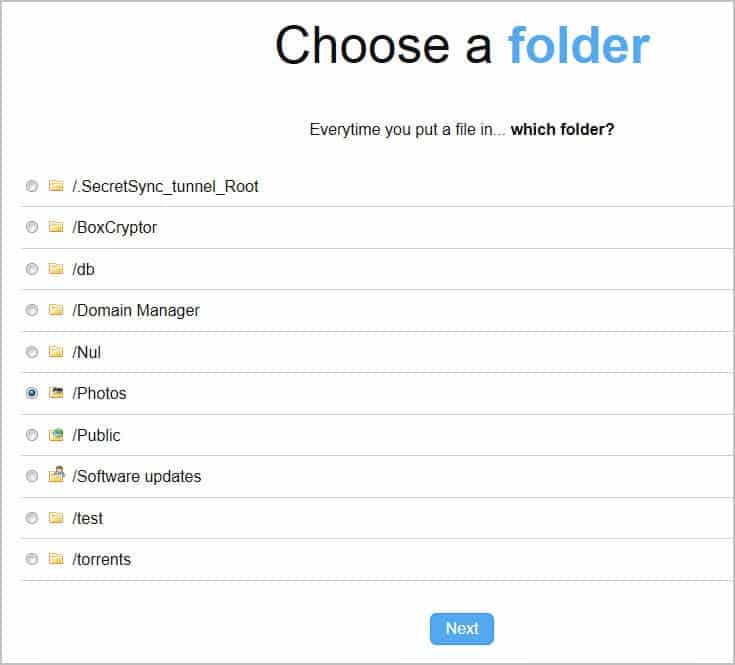
You can then start creating tasks by selecting one of your Dropbox folders and one of the available actions. Only existing folders can be selected on the Automator website, new folders need to be created on the Dropbox website or on a PC connected to Dropbox.

dropbox automator

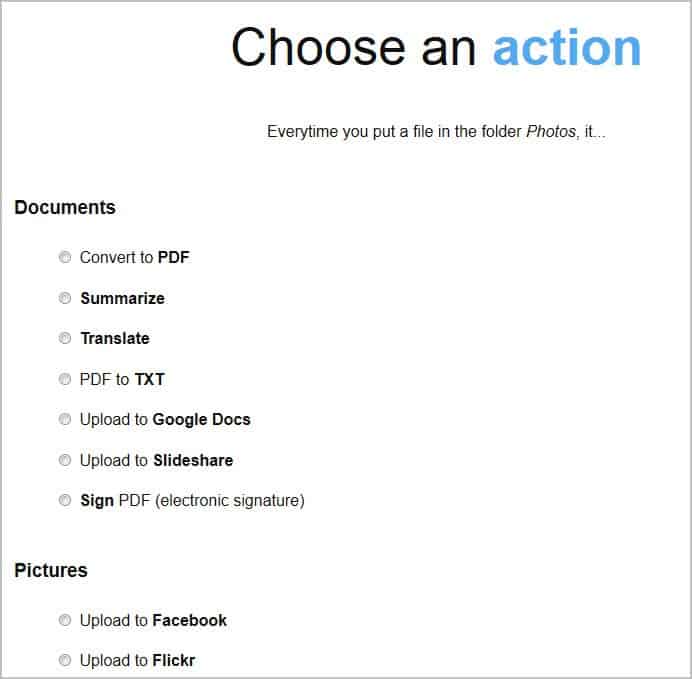
actions

Four groups of actions are available:

  • Documents: Convert to pdf, summarize, translate, pdf to text, upload to Google Docs, upload to Slideshare, sign pdf (electronic signature)
  • Pictures: Upload to Facebook, upload to Flickr, downscale, rotate image, write text on image, photo effect, stamp a logo on the image, stamp a map on the image, stamp a dislike on the image
  • Any file: E-mail, zip file, save it to another Dropbox folder, rename, upload to ftp server, encrypt, decrypt
  • Send Info: Tweet, Set Facebook status

Some actions require you to enter parameters, for instance ftp login information, selection of a photo effect or an email address that should receive the notifications.

Some actions use programming function names instead of better readable and explanatory names. This can be confusing at first, considering that action.pics.writeOnImage.text is not as self-explanatory as Text to Write.

Processing time depends largely on the selected tasks and the server load. The original files are moved to the processed folder where they are kept, the processed files to a results folder. It can take quite some time before the process completes.

Multiple actions can be configured for a folder. You could for instance translate a document and convert it to pdf, or resize a picture before it is uploaded to Flickr.

Dropbox Automator is a useful tool for Dropbox users who are currently processing files manually before they put them into their Dropbox storage. The developers need to work a bit on the descriptions displayed to the user. A progress indicator would also be useful. (via Lifehacker)


© Martin Brinkmann for gHacks Technology News | Latest Tech News, Software And Tutorials, 2011. | Permalink |
Add to del.icio.us, digg, facebook, reddit, twitter
Post tags:


Ifttt, Create If Then Actions On The Internet

Have you ever asked yourself why it is not possible to automate basic tasks on the Internet? I’m not talking about opening your favorite homepage in your web browser, but about tasks that rely on different services.

Ifttt is a new service that lets you create if then actions on the Internet. It basically lets you create automated tasks that consists of a trigger (the if) and an action (the then).

Lets take a look at a few examples:

  • Post a message on Facebook on January 1 midnight
  • Receive an email when a new Kindle Top 100 free ebook is available
  • Get an email if it is raining tomorrow
  • Get SMS notifications when you receive new emails
  • Archive Tweets to Google Calendar
  • Tweet when you publish a new blog post

Triggers and actions rely on channels to function. A channel can be a website like Twitter, Facebook, or a method to communicate like email.

New tasks are created by selecting a channel and a trigger for the if part of the task. Lets say you have selected Dropbox as the channel. The program displays triggers on the next page of the task creation wizard. Two triggers are available for Dropbox: new file in your public folder or new photo in your public folder.

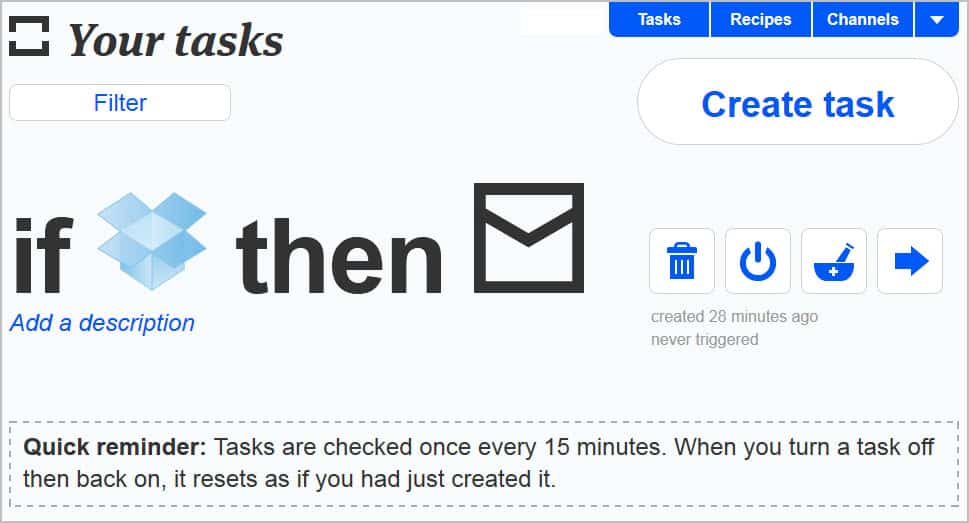
ifttt

Once you have selected the if, you are asked to configure the then, the action.

The service displays a list of channels that you can use the Dropbox information with. You could select to receive emails whenever a new photo is uploaded to a selected public folder, upload the photo to your Facebook account automatically, or post a new Twitter message that links to the photo.

You need to link most channels to your account before you can create actions using them. The program will use authentication on the official site to do that, which means that you never have to enter those account information on the ifttt page.

Tasks are then saved and checked once every 15 minutes. You can turn tasks on or off, delete them or publish them as recipes. You can take a look at existing recipes and all channels here.

The service keeps track of all user activities which are accessible in the activity log. You can also remove channel authorization right on the ifttt website.

The majority of tasks that you can create either notify you, or automate the publishing of information for you. Users who use at least one or two of the supported websites or services may be able to automate and speed up their workflow significantly.


© Martin Brinkmann for gHacks Technology News | Latest Tech News, Software And Tutorials, 2011. | Permalink |
Add to del.icio.us, digg, facebook, reddit, twitter
Post tags:


Internet Giants Consider SOPA Strike

The Stop Online Piracy Act in the US is getting ever more publicity with GoDaddy one of the high profile companies to suffer from supporting it as we wrote a couple of days ago.  In our previous article Martin summed up SOPA very effectively.

If you are living in the United States, you should have heard about SOPA (Stop Online Piracy Act) and Protect-IP, which, when passed, would give companies rights that they should not have. If it passes, IP rightsholders (a term vaguely defined) could send notices to payment processors or ad services like Google Adsense to force them to stop doing business with listed websites, all without legal process.

Site owners have five days to file a counter-notice, but neither payment processors or ad networks have any obligation to respect it. Even worse, they are granted “immunity for choking off a site if they have a “reasonable belief” that some portion of the site enables infringement”.

Now a loose confederation of Internet giants are considering shutting down the entire websites for 24 hours and instead showing a messagew urging their visitors and customers to contact their representative in the US congress the day before the vote goes to the house there.

The coalition is made up of some very big names on the Internet including Google, Amazon, Facebook, Twitter, Wikipedia, Yahoo!, eBay, PayPal, AOL, Foursquare, IAC, LinkedIn, Mozilla, OpenDNS and Zynga.  If the plan goes ahead all these services could be taken offline for 24 hours.

In a report by CNet…

When the home pages of Google.com, Amazon.com, Facebook.com, and their Internet allies simultaneously turn black with anti-censorship warnings that ask users to contact politicians about a vote in the U.S. Congress the next day on SOPA, you’ll know they’re finally serious.

True, it would be the political equivalent of a nuclear option–possibly drawing retributions from the the influential politicos backing SOPA and Protect IP–but one that could nevertheless be launched in 2012.

“There have been some serious discussions about that,” says Markham Erickson, who heads the NetCoalition trade association that counts Google, Amazon.com, eBay, and Yahoo as members. “It has never happened before.”

This wouldn’t be the first piece of anti-piracy legislation around the world to face stiff opposition.  France have already passed an Internet copyright law but the Digital Economy Act in the UK stalled in the face of arguments from major Internet Service Providers British Telecom and TalkTalk.

Many reports say that SOPA is still set to pass the US congress and that very few Americans have heard about it.  Shutting down services such as Facebook and Google, and replacing them with anti-SOPA messages for a day would certainly raise awareness, but a question mark remains over whether doing so only one day before the congress vote would be effective enough.

This is the first time ever that major websites have threatened to effectively go on strike to boycott something, and it is completely unprecedented.  It is unclear at this time whether the services would be taken down worldwide or just in the US and also how serious the coalition are about the boycott, which would inevitably lose them all a day’s trade.

Services are commonly targeted for IP addresses anyway and it wouldn’t be difficult for these companies to target messages to their US-based users.  With many millions of visitors every day in the US, companies such as Google and Facebook could achieve this on their own.  Imagine then how much more leverage they would have with Amazon, Yahoo! and others on board.  If this goes ahead it is still possible that other companies could follow suit, effectively crippling the Internet in the US for the day before the vote.

So what do you think of SOPA and your favourite websites being taken offline for a day?


© Mike Halsey MVP for gHacks Technology News | Latest Tech News, Software And Tutorials, 2011. | Permalink |
Add to del.icio.us, digg, facebook, reddit, twitter
Post tags: , , , , , , , , , , , , , , ,


Wait Wait

You can't stab Carl Kasell. He sounds all slow and stentorian, but he moves like a snake.

Thursday, December 29, 2011

Check Online For Text Copies With Desktop Plagiarism Checker

Duplicate content is one of the things that webmasters need to avoid on their own domains as web search engines like Google or Bing can penalize websites for duplicate content. Webmasters have less options when dealing with content that someone else copied from their websites. Content scraping is a lucrative business, primarily due to the fact that it is possible to automate the whole process with scripts and that setup usually does not take longer than a few minutes.

This too can have ill effects for the original content creator, for instance when content scrapers rank above the webmaster’s original content or reputation is at stake.

Search engines ask webmasters to file DMCA requests to take down copied contents, but this requires extensive research. While it is possible to use the search engines for that, for instance by searching for article titles or the first paragraph, it is often better to use specialized tools for the job.

Desktop Plagiarism Checker offers to search on Google, Bing, Yahoo, Google Scholar or Google Books for text queries or documents. A free account is required before the program can be used.

check duplicate content

Just paste text into one of the two tabs in the program and select one of the available search engines to search for duplicate content on the Internet. It is alternatively possible to load a text file into the program (supported are txt, htm, doc, pdf, rtf or odt) to search for the file’s contents instead.

A click on check duplicate content runs the search query and displays the results in a new program window. The number of hits, the query and domains found to contain the query are listed here in a table. Each sentence is analyzed and displayed separately in the results window.

The query itself links to the results page of the selected search engine. Only the root domain name is displayed in the results window. This is a problem as deep links are needed when filing DMCA requests. Results can be exported as pdf documents for safekeeping or further processing.

Checking online for duplicate content is only one of the ways the program can be used. Teachers can use it to check if students have copied parts or all of their essays and work from other sources.

The program lacks several features that would improve it further. This includes a full url listing of sites where the entered query has been found on, the ability to file DMCA requests directly from the program interface, and options to email the webmaster or the hosters abuse department are just a few that come to mind right away.

Desktop Plagiarism Checker can be downloaded from the developer website. The very same plagiarism checks can be run directly on the website. Guests see only limited results, registered users all details.


© Martin Brinkmann for gHacks Technology News | Latest Tech News, Software And Tutorials, 2011. | Permalink |
Add to del.icio.us, digg, facebook, reddit, twitter
Post tags: ,


Speed Up your Internet with Auslogics Internet Optimizer

Repairing or tweaking an Internet connection can be quite the troublesome experience sometimes. It may take a long time before you resolve the problem or find the setting that normalizes your Internet connection speed. And while you normally cannot get more out of the line than you have subscribed to, you can make sure to get the most out of the connection whenever you connect to the Internet.

Auslogics Internet Optimizer is a free tool that tweaks several system and application specific settings to improve the speed and reliability of the Internet connection.

Before you use it to tweak your connection, you should consider running speed tests to see if there is room for improvement. See the articles Internet Connection Speed Analysis, Internet Connection Reliability Test and the Speedtest review for programs that can aid you with the task.

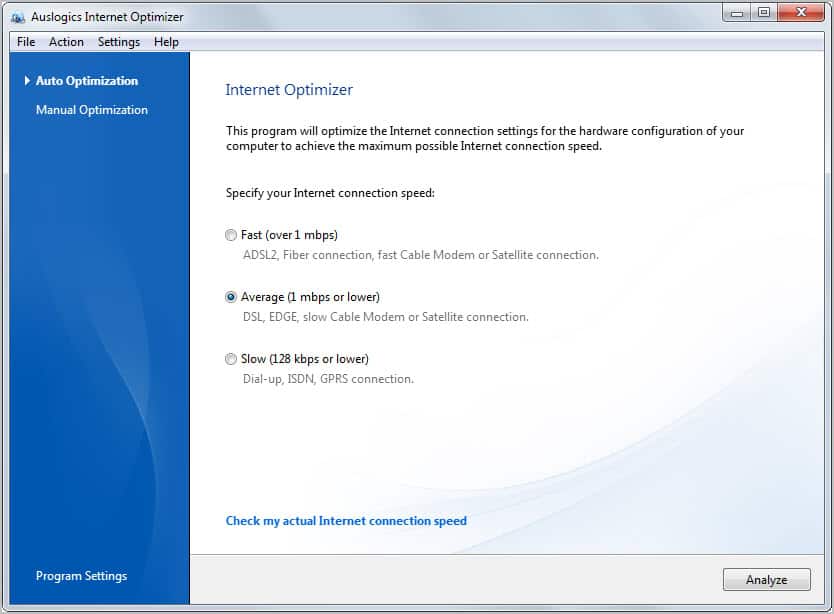
auslogics internet optimizer

The program, that is also part of Auslogics’ commercial performance software BoostSpeed, offers two modes of operation. Inexperienced users can let the program handle all the optimizations by simply selecting an Internet connection speed from the list. Available for selection are Slow (128 kbps or lower), Average (1 mbps or lower) or Fast (over 1 mbps). The program optimizes the system and applications for the selected speed in this case.

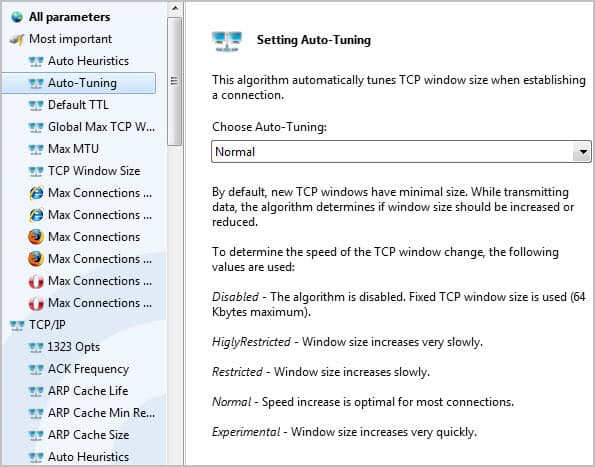
The manual atomization mode reveals all settings and values the program can make changes to. The Internet Optimizer displays the most important settings at the top, followed by detailed global and application specific parameter listings.

Internet Explorer, Firefox or Opera users can for instance change the number of total and per server connections easily.

optimize internet connection

A click on a browser listing opens roughly ten parameters that can be modified to speed up the Internet connection. This includes disabling prefeteching or IPv6 in Firefox, the network buffer size in Opera or enabling TCP Autotuning in Microsoft’s Internet Explorer.

Most parameters are listed with descriptions that aid the user in the configuration. Inexperienced users will however have difficulties picking the optimal value for their Internet connection.

parameters

Auslogics’ Internet Optimizer is a useful program for users who experience Internet connection speed or reliability issues. Automatic and manual modes make the program interesting for users of all experience levels.

Windows users can download the latest version of the program from the Download Crew website. (via Techdows)

A comparable program is TCP Optimizer.


© Martin Brinkmann for gHacks Technology News | Latest Tech News, Software And Tutorials, 2011. | Permalink |
Add to del.icio.us, digg, facebook, reddit, twitter
Post tags: , ,