Pages

Wednesday, February 1, 2012

Microsoft Slam New Google Privacy Policy in Newspaper Advert

Last week Google announced changes to its privacy policy that, on the face of it seem perfectly reasonable.  In essence they want to treat all the different Google services you use as a single big account and share the data.  What this ultimately means though is that the company will know absolutely huge volumes of information about you.

For instance they’ll see what emails you receive and subscribe to, what videos you watch, what things you search for, what sorts of documents you work on and what the content of those documents is, what you blog about, what you take photographs of and where, what newspapers and blogs you read, what you buy online, what parts of the world you’re interested in (and where you live), who you chat to and what you like to buy.

All of this information, when put together, helps advertisers paint an incredibly detailed picture of you and with about a billion users worldwide, that information is incredibly valuable.

Now Microsoft have hit back with newspaper adverts in the US saying that this isn’t what want at all and that you should ‘obviously’ use their products and services instead.

In the advert they say…

Google is in the process of making some unpopular changes to some of their most popular products. Those changes, cloaked in language like “transparency”, “simplicity” and “consistency” are really about one thing: making it easier for Google to connect the dots between everything you search, send, say or stream while using one of their services.

But, the way they are doing it is making it harder for you to maintain control of your personal information. Why are they so interested in doing this that they would risk this kind of backlash? One logical reason: Every data point they collect and connect to you increases how valuable you are to an advertiser.

So is this fair enough, sour grapes or the pot calling the kettle black?  In fairness it is all of the above as there are elements of all of these in the advert.  Google make almost all of their revenue from advertising and the better and more attractive they can make their own advertising, and the data they collect on their users, the more companies they will attract and the more money they can charge for the (your) personal information.

Many people simply don’t want to be tracked and Microsoft point out that you can do this in the latest version of Internet Explorer.  What they don’t mention is that you can also do it the latest version of Google’s Chrome browser as well and that many of the advertising and data-mining tactics used by Google are also used by Microsoft.

Consumers will have to decide for themselves how they feel about the approach Microsoft are taking here, though many will just see it as a company taking advantage of an open goal for a publicity stunt.  The fact remains though that the US Congress is so concerned about the new changes Google is introducing that they are holding an closed door hearing to discuss what the changes mean.

So what do you think about Google’s new privacy policy?  Have you even heard about it and what do you think of Microsoft’s response?  Why not tell us in the comments below.


Create Stunning Photo Slideshows With IMGDissolver

If you ever wanted to create a stunning photo slideshow for your own personal use or for distribution, you’d probably discovered that it can be quite difficulty to find the right program for the job. We have covered slideshow creators like Wow Slider for instance in the past.

IMGDissolver has been released in an early alpha version, and while that early stage of development shines through somewhat when using the software, you’d be surprised at the functionality that is already integrated.

You can not only add photo formats but also video formats to your slideshow in the main tab of the application. A click on Add Images opens a file browser that you can use to add supported formats. Next to standard image formats such as jpg, png and gif, it also supports popular video formats like mpg, avi, mov or ogg.

img dissolver

The same configuration screen offers options to change the brightness, contrast, saturation or gamma, and red, green and blue values. A click on Effects furthermore displays effects like sepia, blur or gray scale that you can apply to individual positions.

You can add music to the slideshow under the Music tab. Just browse to an mp3 file on your computer and click the add button to have it play in the background while the slideshow is displayed on the screen.

Transition effects are applied under settings. Here you can select nice looking effects like mosaic, door or fall down, as well as background colors, the duration each image is displayed and filters that are applied to all photos.

The program ships with audio and video tools that you can use to merge or concatenate audio files, or to cut videos. This is nice for quick last minute editing.

You can play the slideshow right on the computer, save it in the program’s own format to play or edit it at a later time, or convert the slideshow to divx or DVD compatible formats. The former generates an avi file that you can play in all media players that play avi files, the latter saves the slideshow as an ISO image that you can burn to DVD.

This can then be played back on the television and compatible video DVD players. As far as the avi goes, you can select a resolution that you want the video to be in. Available resolutions range from 320×240 to 800×576. There is unfortunately no option to save photo slideshows in larger resolutions.

The only negative is that it sometimes loads slowly. It took about ten seconds for the program window to show up after start, and maybe five or so seconds to switch between some program menus. It is likely that the developer will resolve those issues in future versions.

It takes minutes to create great looking photo slideshows with IMGDissolver. The option to save them as avi or DVD compatible files ensures that they can be played on nearly every system. Great program, highly recommended.


Add A Calculator To The Firefox Status Bar

If you have to do calculations regularly you have probably a software calculator or physical calculator accessible right next to you. And even if you do not, you could probably just fire up a search engine like Google for some quick calculations.

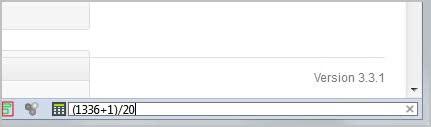
The Firefox add-on Status-bar Scientific Calculator offers another option. It adds a single icon to the status bar of the web browser that expands to a form on click. Here it is then possible to make basic and advanced calculations without ever leaving the browser window.

firefox calculator

Just type in the values like you would in a normal calculator, and keep in mind that you need to use brackets to change the processing order. The calculator supports all basic operations plus a lot of advanced operations that involve complex numbers. Among those are switching from decimal and hexadecimal to all other bases from 2 to 24.

scientific calculator

Some options can be switched with a left-click on the icon and the selection in the context menu. Others are only available in the calculator’s options.

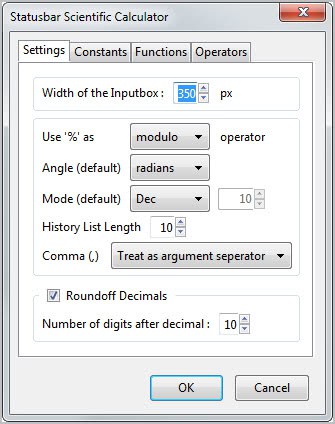
Here it is for instance possible to define constants and functions. Constants like pi, e or the Boltzmann constant are already available, with options to add more constants easily. These constants can simple be added to the calculation to make use of them.

It is the same for functions, even though it appears to be slightly more complicated to create new ones as basic programming skills are required. The add-on ships with three functions.

You last not but not least can configure operators of which three are available as well.

The add-on supports up to ten digits after the decimal point, with options to increase or decrease that number in the settings.

Firefox users who would like to give a built-in calculator a try can download and install the extension from the official Mozilla Firefox add-on repository.


Looking For A Torrific Alternative? Try These!

Torrific offered a handy service for users who needed to download torrents files but could not use Bittorrent software or seedboxes for it. The service basically did all the hard working for the user. It downloaded the files attached to the torrent to their servers, and provided users with direct http download links. Torrific unfortunately though has been down for the last few days, and it is unlikely that the service will return again.

I have received emails and user comments from several users who wanted to know if there is an alternative to Torrific. There is, and it goes by the name BitLet. It is a web Bittorrent client that is powered by Java. You can just visit the website to get started right away, an account is not needed. Torrents can be added in two ways, first as web urls and second from the local computer system. You can paste in urls right away, or click on the select local torrent button to select a torrent from your system.

A click on download torrent opens a download window that displays information about the download status.

download torrents website

You are asked to select a destination directory for the files, and sit back afterwards as everything else is handled automatically from that moment on. Once finished, you can keep the torrent open to continue seeding it, or close the window to close all connections.

Bitlet on the other hand is not completely identical to Torrific, as the latter service downloaded the files first to their service, before they were made available as http downloads to the user.

Users more interested in an identical service can try ziTorrent, which offers pretty much the same functionality as Torrific. A free account is good for 10 Gigabytes of traffic, with a maximum file size of 1 Gigabyte per torrent per month. The service did not work that well though during tests, but this may have been a temporary flux.


Using Virtualization in Windows 7 Free Webcast

As we all use computers over more and more years we become comfortable with software that “just works” and we want to continue using it for as long as possible.  This causes problems though as Microsoft develop new versions of Windows as, no matter how well each version of Windows is supposed to be compatible with all the Windows software that came before it, they’re just not.

The solution is to use virtualisation tools and on any modern PC this becomes relatively simple (depending on the tools you use).  In my monthly free webcast for February I’m taking a beginner’s look at virtualisation, examining what it is and the different tools available, and looking at how you can use it on your PC to help you keep running older software and how you can have multiple operating systems running side by side.

With a PC bought in the last couple of years you can run multiple operating systems side by side with little or no performance loss overall, as modern processors are very efficient at handling the extra OS calls virtualisation produces, and the amount of memory in modern PCs is more than enough for even demanding tasks.

The webcast takes place online at 10AM PT San Francisco | 6pm – London | 1pm – New York | Fri, Feb  3rd at 5am – Sydney | Fri, Feb  3rd at 3am – Tokyo | Fri, Feb  3rd at 2am – Beijing | 11:30pm – Mumbai on Thursday 2nd February.  It’s completely free and if you can’t make it live you can watch it recorded afterwards provided you have registered before it begins.  You can register for this webcast here.


Where Did All The Megaupload Traffic Go To?

Megaupload was one of the most visited sites on the Internet before its take down earlier this month. No one up until now looked at the consequences of that takedown in regards to the traffic the site received. Did it just go *poof* or did users flock to other sites instead to do whatever they have been doing on Megaupload?

One way to find out is to look at Alexa’s comparison chart. Alexa computes a site’s global and local rank from data gathered by its toolbar and a number of additional sources. While not 100% accurate, it can give an indication of a site’s traffic performance over time.

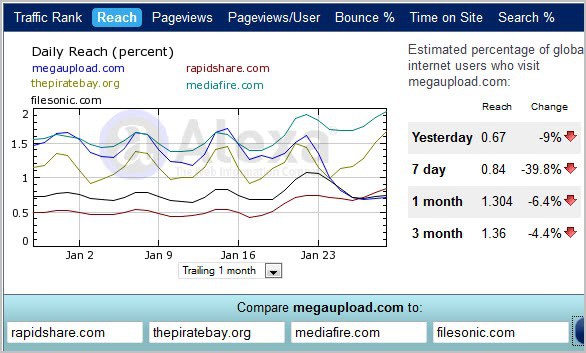
Even better, you can key in up to four competitive sites to compare their performance with the selected site. When you do that for Megaupload, and the four sites ThePiratebay, Rapidshare, Mediafire and Filesonic, you come up with the following graph.

megaupload traffic winners

Megaupload was shut down on January 20, and you can see a big drop shortly thereafter (the blue line). The site stayed on a high level nevertheless. This is explained by users still clicking on links leading to the site. While these links return a 404 error, Alexa may still count the visits. It is likely that the site will slowly drop to 0 over the coming months.

You also see that Filesonic experienced a drop. This is because of the site’s announcement that they would block the site’s file sharing component.

The Piratebay on the other hand saw a huge increase in daily reach a few days after the takedown. The site went over the 1.5 daily reach mark in percent which it never crossed before in January. Mediafire saw a big jump in traffic as well during that same time. Rapidshare, another file hosting company saw a lighter increase.

This is no proof obviously, and traffic may have increased because of other reasons. It is however likely that Megaupload and Filesonic users simply moved on to use other services. And those are not only file hosting related, considering that The Piratebay’s traffic increased as well. What’s your take on the matter?


Baby Names

I've been trying for a couple years now but I haven't been able to come up with a name dumber than 'Renesmee'.